
The first thing you should do is to answer the question "which specific behavior do you want to incentivize?". With that question answered, you will be able to proceed with the process, by defining all the metadata related to it.
After all, in this process, are not just talking about creating a Behavior record (formerly known as Rule trigger) inside FieloPLT. We are talking about everything that is related to that behavior in the Salesforce org, which can be:
- Salesforce metadata
- Apex Classes
- Apex Triggers
- Flows
- Pages & Layouts
- Objects & Fields
- Etc
- Fielo Configurations
- Library
- Behavior
- Actions
- Incentives
- Programs
- Etc
In this section, we will create a new Behavior App to incentivize Case closing and SLA (Service Level Agreement).
We designed and developed some business logic involving the Case Object, which is set up on a Developer Org. The objective is to make it reusable so that other customers may use our automation to incentivize their call center agents, field services, and so on.
The following picture represents a simple flow of how we are going to create the Fielo extension package.
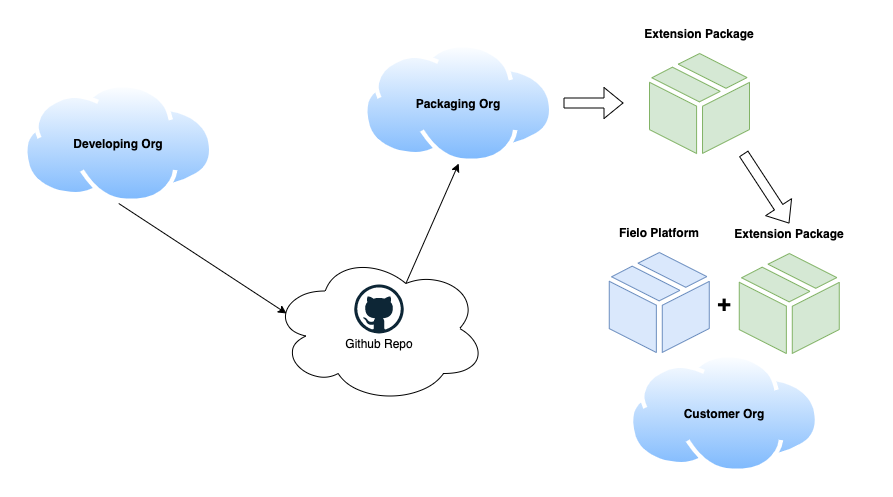
Extension package's creation flow
We will use:
- 3 Developer Orgs
- One representing the project org (Developing Org)
- One as the packaging org (Packaging Org)
- One as the new customer's org (or the one to test the new package - Customer Org)
- 1 Github repository
If you are familiar with Salesforce DX and already have your dev hub properly set, you can use scratch Orgs to test your progress and the consistency of your GitHub code. Once the goal of this section is not to teach how to configure a develoer hub, we will continue with 2 Developer Edition Orgs.
Define the Use Case
The use case that we are going to use is the Close Cases App.
Once you have everything set - the behaviors, incentives, and any business logic you desire -, you have to list everything that was needed to automate that. In our case, our "project" consist of the following metadata and configuration objects:
Salesforce metadata
| Name | Type | Description |
|---|---|---|
| F_Cases.cls | Apex Class | Domain class for the trigger F_Cases.trigger. Holds some business logic |
| F_Cases.trigger | Apex trigger | Trigger that listen for changes (insert/update) of the Case Object |
| TestF_Cases.cls | Apex Class | Test class for the trigger and domain class logic |
| Case.Member__c | Custom Field | Lookup to the incentivized member |
| Case.SLAInDays__c | Custom Field | Field that holds the SLA in days |
| Case.SLAInHours__c | Custom Field | Field that holds the SLA in hours |
| FieloPLTPointc.Case__c | Custom Field | Field to audit the case that gave that point record |
| FieloPLTTransactionc.Case__c | Custom Field | Field to enable each time incentives |
| FieloPLTTrackerc.Case__c | Custom Field | Field to enable over time incentives |
| CasesAppPermissionSet | Permission Set | Permissions required to use the app |
Fielo configurations
| Name | Type | Description |
|---|---|---|
| Case | Behavior | Configuration that listens to changes in the Case objects and act as a trigger for Fielo Rules Engine |
| Close Case | Action | Configuration that tells which actions performed against the case object should be listen and which member should be incentivized |
| Callcenter Program | Program | Loyalty program that holds all the loyalty business logic of this project |
| Close High Priority Cases on time | Promotion | Promotion to reward agents that close high priority cases on time |
| Close Low Priority Cases on time | Promotion | Promotion to reward agents that close low priority cases on time |
| Close Medium Priority Cases on time | Promotion | Promotion to reward agents that close medium priority cases on time |