
Manage Event Configs
You may want to make adjustments to the prepackaged event configs, or even create your own. Use this guide to understand each of the configuration options for Fielo Time-Based Events.
To modify an event config, click on its name.
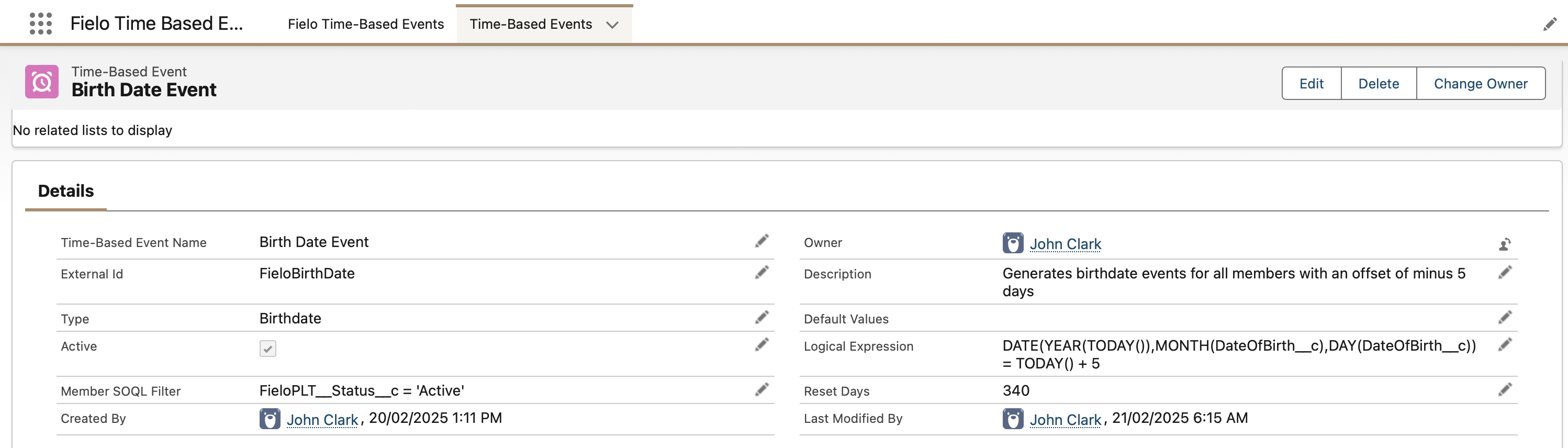
Type
This is the type of event the config will generate. Ensure that this value corresponds to an existing value on the Type picklist of the Event (FieloPLT__Event__c) object.
Active
Events will only be generated by this config if ☑️. If you don't plan to incentivize events of this config's type, disable this setting in order to save org storage space.
Member SOQL Filter
Events will only be generated for members who meet the criteria defined in this SOQL expression. By default, this checks whether the member is active. Other things you might want to check is which program the member is in, the member's type, and more.
Default Values
This is optional. Events will be generated with the defined field values. For example, to generate events with a Value of 100, you can specify:
{
    "FieloPLT__Value__c": 100
}
Logical Expression
This is how the config determines when to generate an event for a given member. When the formula expression evaluates to true for a given member, an event of the config's type will be generated for that member. For birthday/anniversary events, be sure to convert the year of the historical date to this year in order to properly compare it with today's date.
Reset Days
This is the number of days members must wait before they can have an event of this type generated for them again.
Updated over 1 year ago