
Upgrade from R2 2023 to R1 2024
FieloPLT v2.186.21
If you're using Fielo’s R2 2023 release, upgrade to R1 2024 to take advantage of all the features and enhancements we've added to the platform. Take a look at What's New in R1 2024. Continue reading to upgrade to Fielo R1 2024.
Versions Prior to R1 2023If you're using a version prior to R2 2023, you must perform all of the upgrades required to get you to the R2 2023 release (v2.172+) before proceeding:
- Upgrade steps for versions 2.23 through 2.51
- Upgrade from Spring '18 to Summer '18
- Upgrade from Summer '18 to Winter '19
- Upgrade from Winter '19 to Spring '19
- Upgrade from Spring '19 to Summer '19
- Upgrade from Summer '19 to Winter '20
- Upgrade from Winter '20 to Spring '20
- Upgrade from Spring '20 to Spring '21
- Upgrade from Spring '21 to R1 2022
- Upgrade from R1 2022 to R2 2022
- Upgrade from R2 2022 to R1 2023
- Upgrade from R1 2023 to R2 2023
Also, make sure you're logged into your Salesforce org and have system administrator permissions before getting started.
How to Upgrade
Follow these steps to start the upgrade process:
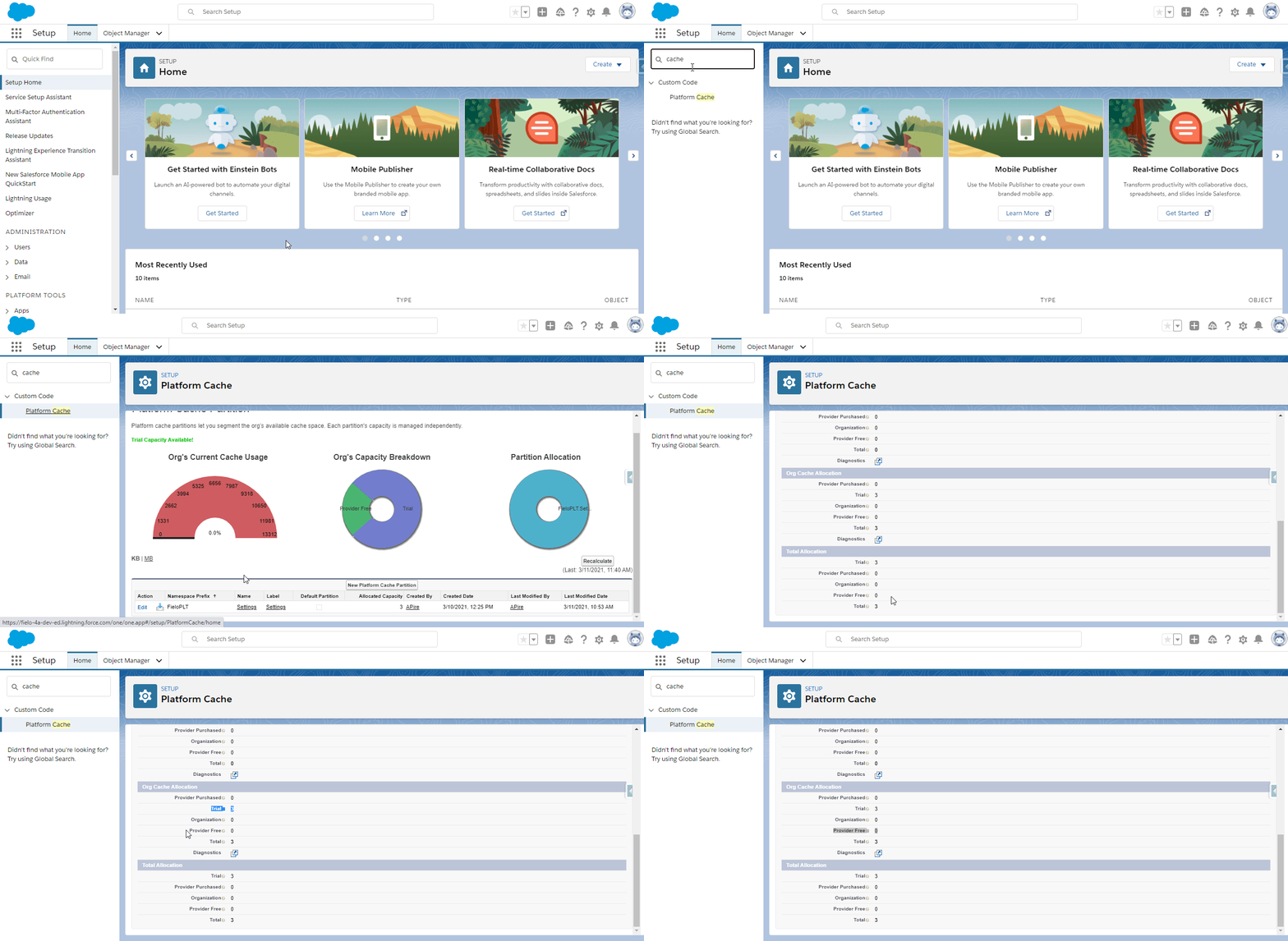
- Make sure that your org has Platform Cache enabled and 3MB or more of Org Cache allocated to FieloPLT.
- In Custom Settings, make sure that the Public Settings for FieloPLT have at least the default organization-wide values defined in the package.
- In Scheduled Jobs, ensure that your org is not at or near its limit of 100 jobs per day.
- On the Incentives tab, check for any Promotions or Challenges that are in Edited status. Before installing the new package, select Apply Changes on these incentives so that their statuses move to Active.
- Click here to install the FieloPLT package.
- If any internal users that are not admins will use Fielo, click Install for Specific Profiles and select Full Access on the profile(s) of those users. If only System Administrators will use Fielo, or if internal users are granted permissions via the FieloPLT Admin permission set, click on Install for Admins Only.
- Click Upgrade. When the first part of the upgrade process is finished, you will be notified by email.
- Once you've been notified, in Salesforce Setup, search for and select Apex Classes and then click Compile all classes.
Verify Cache Chunk Size
If you use Challenges, verify that your cache chunk size is no greater than 300. To do so, go to Salesforce Setup and navigate to Custom Settings. Next to Public Settings (namespace: FieloPLT), click Manage. The setting called Cache Chunk Size should have a value of 300 or less.
Reset Dashboards
On the Home tab, click Dashboard Settings and then Reset Dashboard. Repeat this on each of your programs.
Update Behavior Type Layout
In the Object Manager, go to the Behavior Type object (FieloPLT__RuleTrigger__c) and navigate to Page Layouts.
For each page layout your team members use, add the following fields:
- Lookup To Parent Behavior (FieloPLT__LookupToParentBehavior__c)
- Parent Behavior Type (FieloPLT__ParentBehavior__c)
Also add the related list Child Behavior Types, remove the New button, and include the following fields:
- Name
- Object
- Status
- Date
Update Point Layout
In the Object Manager, go to the Point object (FieloPLT__Point__c) and navigate to Page Layouts.
For each page layout your team members use, add the following fields:
- Is Obsolete
- Obsolete Date Time
Upgrade Libraries
Go to Fielo > Tools and verify that you're on the latest version of each of the libraries you're using. If an upgrade is available, click Upgrade.
During the upgrade of FieloTemplates library, if you receive the error “This Behavior Type cannot have this Parent because one of its actions has a rule that is scoped to a related list (Master-Detail)", this means that your org has Master-Detail rules using the Opportunity Products related list. To proceed, deactivate that rule's promotion, upgrade the library, and then change the rule to use the action of the child behavior instead (Opportunity Product).
Activity Feed: Update Categories to Exclude Property
The Fielo MX - Activity Feed LWC now uses label names in the Categories to Exclude property. If you use this component, you'll need to update any values in Categories to Exclude as follows:
| Old Value | New Value |
|---|---|
| Badges Earned | BadgesEarned |
| Currency Deduction | CurrencyDeduction |
| Currency Received | CurrencyReceived |
| Incentive Completed | IncentiveCompleted |
| Instant Reward | InstantReward |
| Opted-In Incentive | OptedInIncentive |
| Opted-Out Incentive | OptedOutIncentive |
| Payouts Received | PayoutsReceived |
| Tier Demotion | TierDemotion |
| Tier Promotion | TierPromotion |
| Modules completed | FieloELR__ModulesCompleted |
| Courses completed | FieloELR__CoursesCompleted |
| Invoice Status | FieloPRP__InvoiceStatus |
That's all. You are ready to use the R1 2024 Fielo release!
For more in-depth info on the release, check out the R1 2024 Technical Release Notes.
Updated 11 months ago