
The Simulation API Class - responsible for building the Incentive Planner - allows you to deliver to members all the relevant information regarding the available Incentives in your Program, such as how much Currencies they can earn through every Incentive that is eligible to them, what they need to do to earn a certain amount of Currencies and the maximum amount that they can win.
The Preset and The Return
Before using this Class, it is mandatory to first setup a Preset. See more about that in Incentive Planner.
The Simulation API Class will look for the Preset that was created for the Object (record) that you inform when you call the API, and use that Preset configuration to generate the simulation. Therefore, which Currencies the Simulation will return and which actions, segments and Excluding Criteria it will consider, depends solely on what was set up in the Preset.
Note that if you have more than one Preset for the same Object, the API will take into consideration the one that was created first. As a best practice, we suggest to have only one Preset for each Object.
The FieloPLT.SimulationAPI Class includes one method.
Simulate Rewarding (simulateRewarding)
static Object FieloPLT.SimulationAPI.simulateRewarding (List<SObject> records, Id memberId, Boolean useOnlyMemory)
Returns the quantity of Currency(ies) that the Member will win through each Incentive reward available for them. It also delivers information about how each record (i.e. Object records) will contribute to the Currency reward.
For example, imagine that your Program has one Promotion with 3 Rules that will reward members for every opportunity closed, and each Promotion Rule has different criteria. Consider that Rule A rewards 100 Points, Rule B rewards 50 Dollars and Rule C rewards 30 Points per opportunity closed.
The member Abigail Wells, who has 2 non-closed opportunities associated to her, accesses the Incentive Planner that you set using the Simulation API Class. Taking the Rules criteria into consideration, closing the Opportunity A will give Abigail the rewards from Rule A and C and closing Opportunity B, the reward from Rule B.
Abigail selects the two opportunities, so that their record are sent to the API, and gets the following data detailing what she can win when she closes her opportunities:

The Simulation breaks the result in three parts, in this specific order:
- Per Currency.
- Per Record.
- Per Incentive - and within it, Rule, Mission or Challenge rewarding.
Note that in this case, "rewarding" means each reward. While in Rules this won't occur, it is possible to get a result related to a Challenge or a Mission where there will be more than one reward related to it - one for each range or member level, depending on the rewarding scheme used.
The rewarding result also details the Rule, Challenge or Mission criteria.
Capping
If any cap is active in your program on the day the simulation is done, it will also be taken into consideration. The simulation will specify how much was actually capped ("hard cap") and how much was above the cap limit, but not discounted ("soft cap").Other than that, when the cap by period is applied throughout the entire program, the simulation takes the member's balance into account.
Parameters
| Parameter | Type | Description |
|---|---|---|
records |
List<SObject> |
IDs of Object records that will be used to simulate. E.g. a list of opportunities records. |
memberId |
Id |
ID of a specific Program Member. |
useOnlyMemory |
Boolean |
Used to inform whether the records are in the database (false) or in memory (true). |
Be sure that the records sent have all the needed information, otherwise an error will occur.
Return
| Type | Description |
|---|---|
|
Map of currencies structure, which key is the currency's ID in the org. |
class PointType {
    // Eligible amount for the currency
    Decimal amount;

    // Maximum amount one can get for the currency
    Decimal maximum = 0;

    // Amount that was capped from the eligible amount for the currency
    Decimal cappedAmount = 0;

    // Amount that would be capped from the eligible amount for the currency
    Decimal softCappedAmount = 0;

    // Amount that would be capped from the maximum amount for the currency
    Decimal cappedMaxAmount = 0;

    // Map of records that added value to the amount of the currency
    Map<Id, Record> records;
}

class Record {
    // Eligible amount for the record
    Decimal amount;

    // Maximum one can get for the record
    Decimal maximum = 0;

    // Amount that was capped from the eligible amount for the record
    Decimal cappedAmount = 0;

    // Amount that would capped from the eligible amount for the record
    Decimal softCappedAmount = 0;

    // Amount that would be capped from the maximum amount for the record
    Decimal cappedMaxAmount = 0;

    // Map of incentives that added value to the amount of the record
    // The Id key can be either a Rule Id or a Challenge/Mission Reward Id
    Map<Id, Incentive> incentives;
}

class Incentive {
    // Eligible amount for the incentive
    Decimal amount = 0;

    // Maximum amount for the incentive
    Decimal potentialAmount = 0;

    // Amount that was capped from the eligible amount for the incentive
    Decimal cappedAmount = 0;

    // Amount that would be capped from the eligible amount for the incentive
    Decimal softCappedAmount = 0;

    // List of criteria and their eligible status related to the member running the simulation
    List<Eligibility> segments;

    // List of criteria and their eligible status related to the records being simulated
    List<Eligibility> rewardings;

    // Tells if this incentive is in the path to maximize the outcome for the member
    Boolean pathToMaximize;
}

class Eligibility {
    // Tells if the record or member is eligible or not
    Boolean eligible;

    // Tells if the record or member is potential or not
    Boolean potential;

    // List of criteria that were applied to check the eligibility and their own eligible status
    List<Map<String,Object>> criteria;

    // Mission's Objective (only for Mission Rewarding)
    Map<String,String> objective;

    // Logical expressions which can be applied to Segment/Rule/Mission Criteria as configured in the backend by the program admin
    // Possibilities:
    // "All" (it meets all the established criteria);
    // "Any" (it meets at least one Criterion) and
    // "Custom" (it enables creating a formula based on the established criteria. E.g. ((1 AND 2) OR 3).
    String expression;
}
Maximization
Represented by the maximum parameter in the Return, the maximization will tell how much it is possible for the Member to win from the Program if they win all the possible rewards. This value is summarized per Currency and also per Record.
In the Rewarding's level, you will find the pathToMaximize. At a high level, this informs if that Rewarding is the one giving to the member the greatest amount of Currencies (true) or not (false). If it is (true), then it will be taken into account for the maximum result.
The pathToMaximize can be (false) when a rewarding excludes another. This could happen, for example, if a Mission gives different rewards depending on the member's level - 80 Dollars to Gold level members and 50 Dollars to Bronze level members. In this scenario, the Rewarding for the Bronze level would be pathToMaximize: false.
Other maximization-related tags, associated to each record:
potential: access here for more details. It can be (true) for the record as long as it is not excluded from the Simulation due to the Preset's excluding criteria and it hasn't reached the Incentive's criteria or objective yet.eligible: access here for more details. When it is (true), then the Member doesn't need to do anything else in order to accomplish the Incentive and win the reward; if they perform the incentivized action now, they will win the reward.
If both are (false), the incentive related to them will not be taken into consideration for the maximization and will not show up in the Simulation result. Moreover, a record can be potential: true and eligible: false when it has accomplished the Incentive’s criteria, but not the Mission’s objective (e.g. when you need 3 $1,000 opportunities, but simulate with only 1).
Another important aspect to take note is that, when the reward is related to the record's field - i.e. using a percentage, factor or multiplier Conversion Mode -, if the incentive has a criteria that the record hasn't reached, the maximization will calculate the result based on the criteria's value.
To make it clearer, imagine that there is an incentive with the criteria "opportunities that have an amount greater or equal to $1,000" that will give 10% of its amount in Dollars as a reward, but the opportunity being simulated with is only $500. Instead of calculating that the reward would be 50 Dollars (10% of 500), the maximization will consider it as 100 Dollars (10% of 1,000), which would be the minimum value to receive the incentive's reward.
Maximization & Capping
Any existing cap by period in your program will be evaluated after the maximization. This means that the system will first give the maximization result and, only after that, will you find the calculation related to the capping.
Exceptions
Errors can occur when you use the endpoint. See below the exception that you can receive when using the simulateRewarding:
FieloException: No Simulation Settings found for current configuration
| Type | Description |
|---|---|
FieloException |
Whenever you don't have a Preset created for the Object/Action/Currency defined in the request, an error will occur. |
Limitations
- Simulation
- The record list sent in the API must be from the same sObjectType.
- The Simulation doesn't process the operators CONTAINS in criterion groups when the More Accurate Maximization is not enabled.
- When the Historical Data operator is used in the Mission's aggregation, the Simulation will work only if the member is already enrolled in the challenge, with the goal calculated.
- Audit Points / Simulation: The outcome is divided among accomplished missions despite logical expression. That is, if you have a Challenge reward that doesn't apply to all Missions (e.g. using the logical expression
((1 AND 2) OR 3)), the Simulation will consider as if the logical expression was ALL and divide that result by the missions that were accomplished. - The Simulation will calculate for only 1 member per each time that the API runs.
- Rewarding schemes that depend on other running a batch (e.g. Based on performance rankings at the end of the Challenge) will not be calculated by the Simulation.
- Maximization
- Multiple segments: the maximization accepts only 1 incentive that has multiple segments per simulation when the More Accurate Maximization is not enabled.
- Manual Segment: if the member is not part of the manual segment used by the incentive, then the incentive is not considered as potential and, therefore, the reward is not included in the maximization. Based only on that, the
maximum amountwould be the same as theamount. - Related Data Rules are taken into consideration only when the More Accurate Maximization is enabled.
- Although the simulation considers capping by record for the result calculation, this cap type is not taken into consideration for the maximization.
- Maximization doesn't work with these Mission rewarding schemes: Cumulative rewarding based on performance, Based on performance metrics at the end of the challenge and Different rewards depending on the member's level.
- Performance
- You can send up to 200 records for each Simulation.
- Tested for common Rules + Criterion Groups.
- Simulation works for Master Detail Rules, but it has poor performance.
Use Case
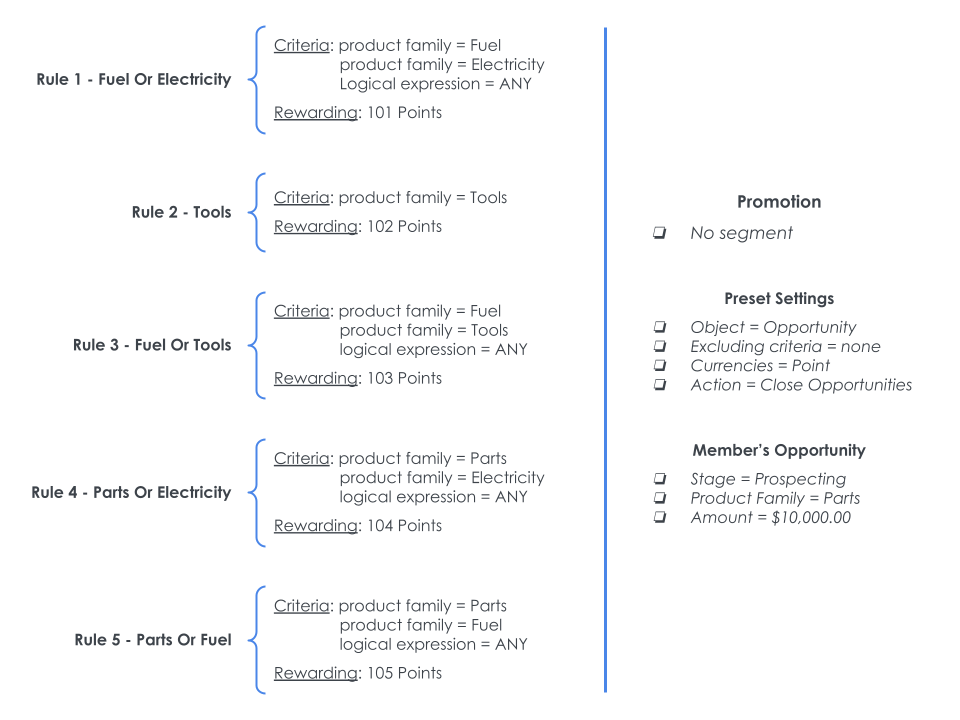
Considering the scenario above, Rule 4 and 5 are eligible because the opportunity being simulated is already from the Parts product family. Meanwhile, since "Product Family" was not added as an Excluding Criteria in the Preset, Rules 1, 2, and 3 are potential.
Pay close attention to the pathToMaximize results. The system calculated all possible outcomes, taking into consideration the Rule's rewarding and their respective criteria, coming to the conclusion that the same opportunity could not be used for all the Rules at the same time.
Check this scenario's return below. Note that, by default, the return identifies all currencies, records, rewarding, rules, missions, and challenges by their IDs. However, we replaced them with their names here to make it easier for you to visualize.
{
   "Point":{
      "softCappedAmount":0,
      "records":{
         "Burlington":{
            "softCappedAmount":0,
            "maximum":310.0,
            "incentives":{
               "Rule 4 - Parts OR Electricity":{
                  "softCappedAmount":0,
                  "segments":null,
                  "rewardings":[
                     {
                        "potential":false,
                        "objective":null,
                        "expression":"ANY",
                        "eligible":true,
                        "criteria":[]
                     }
                  ],
                  "potentialAmount":0,
                  "pathType":"both",
                  "pathToMaximize":true,
                  "cappedAmount":0,
                  "amount":104
               },
               "Rule 3 - Fuel OR Tools":{
                  "softCappedAmount":0,
                  "segments":null,
                  "rewardings":[
                     {
                        "potential":true,
                        "objective":null,
                        "expression":"ANY",
                        "eligible":false,
                        "criteria":[]
                     }
                  ],
                  "potentialAmount":103,
                  "pathType":"both",
                  "pathToMaximize":false,
                  "cappedAmount":0,
                  "amount":0.0
               },
               "Rule 5 - Parts OR Fuel":{
                  "softCappedAmount":0,
                  "segments":null,
                  "rewardings":[
                     {
                        "potential":false,
                        "objective":null,
                        "expression":"ANY",
                        "eligible":true,
                        "criteria":[]
                     }
                  ],
                  "potentialAmount":0,
                  "pathType":"both",
                  "pathToMaximize":true,
                  "cappedAmount":0,
                  "amount":105
               },
               "Rule 2 - Tools":{
                  "softCappedAmount":0,
                  "segments":null,
                  "rewardings":[
                     {
                        "potential":true,
                        "objective":null,
                        "expression":"ALL",
                        "eligible":false,
                        "criteria":[]
                     }
                  ],
                  "potentialAmount":102,
                  "pathType":"both",
                  "pathToMaximize":false,
                  "cappedAmount":0,
                  "amount":0.0
               },
               "Rule 1 - Fuel Or Electricity":{
                  "softCappedAmount":0,
                  "segments":null,
                  "rewardings":[
                     {
                        "potential":true,
                        "objective":null,
                        "expression":"ANY",
                        "eligible":false,
                        "criteria":[]
                     }
                  ],
                  "potentialAmount":101,
                  "pathType":"both",
                  "pathToMaximize":true,
                  "cappedAmount":0,
                  "amount":0.0
               }
            },
            "cappedMaxAmount":0,
            "cappedAmount":0,
            "amount":209.0
         }
      },
      "maximum":310.0,
      "cappedMaxAmount":0,
      "cappedAmount":0,
      "amount":209.0
   }
}