
Upgrade from Summer '18 to Winter '19
If you're using our Summer '18 release (v2.56.x), upgrade to Winter '19 (v2.60.5) and enjoy points and rewards capping, manual badge awarding, and more.
Versions Prior to 2.56.xIf you're using FieloPLT v2.49 or before:
- First, follow these upgrade instructions for each version up to and including v2.51;
- Then, follow the instructions at Upgrade from Spring '18 to Summer '18 to get to v2.56.
Before getting started, make sure you're logged into your Salesforce org and have system administrator permissions.
How to Upgrade
Once you're ready to go, follow these steps to upgrade:
- Click here to access the IAS installation package.
- If any internal users that aren't admins will use Fielo, click Install for Specific Profiles and give Full Access to their profile(s).
- If you're using Fielo components in Community Cloud, find the Community User profile(s) that you're using for your members. From the corresponding picklist(s), choose Fielo Community.
- Click Install. When the first part of the upgrade process is finished, you (or the org admin) will be notified by email.
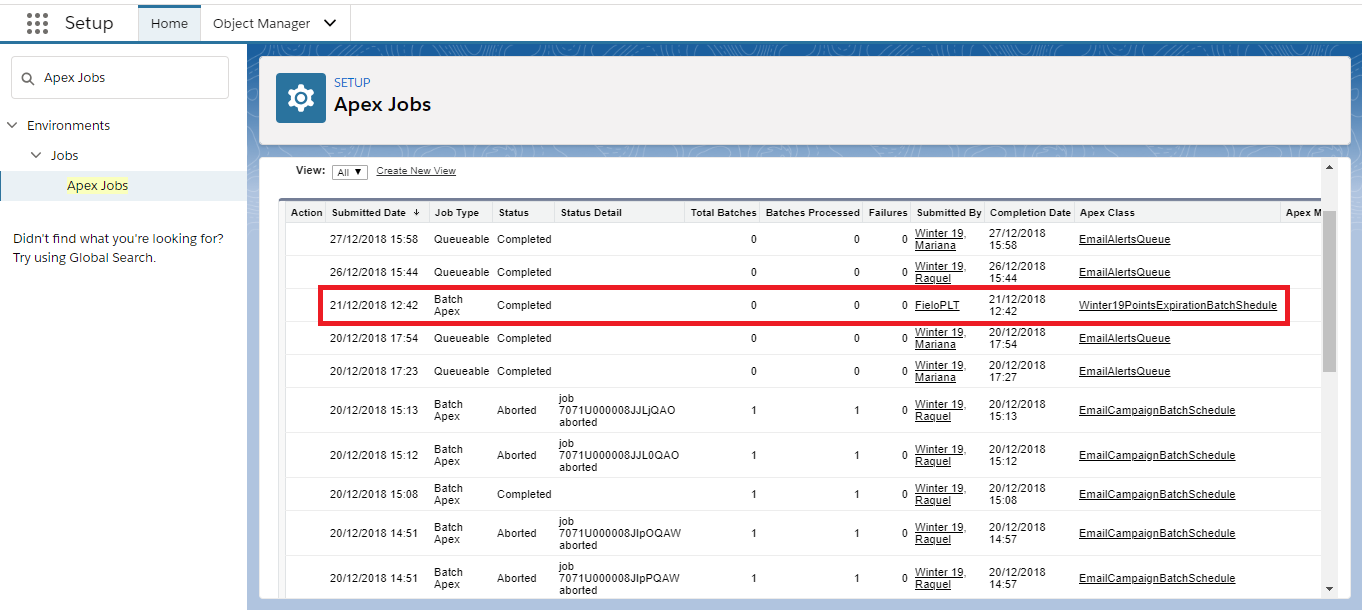
- In your org, go to Salesforce Setup and, in the Quick Find box, find and select Apex Jobs.
- Confirm that the batch called "Winter19PointsExpirationBatchShedule" has completed.
- Once you've confirmed that the batch successfully completed, click the app launcher and enter IAS ("Fielo Platform").
- On the Libraries tab, upgrade the FieloPLT library to v4.001.
If you plan to use Points Capping or Rewards Capping:
- Click on FieloPLT and, under the Page Settings related list, select Cap > Edit.
- On the Cap > Edit page, click Activate.
- Back on the Page Settings related list, find and activate the Program > Related > Cap setting.
Congrats!You're ready to go with IAS Winter '19 edition.
New Objects and Fields
You may want to make sure your org permissions are up to date. Take a look at this reference guide on new objects and fields included in IAS Winter '19 edition.
We've added the following objects:
- Cap (FieloPLT__Cap__c)
- Cap Audit (FieloPLT__AuditCap__c)
- Cap Rule (FieloPLT__CapDomain__c)
- Member Agreement (FieloPLT__MemberAgreement__c)
We've also added new fields (in italics) to the following existing objects:
- Redemption
- Closed Date (FieloPLT__ClosedDate__c)
- Member
- Related Summary (FieloPLT__RelatedSummary__c)
- Related Summary Length (FieloPLT__RelatedSummaryLength__c)
- Program Point Type
- Actual Point Cost (FieloPLT__ActualPointCost__c)
- Configuration Summary (FieloPLT__ConfigurationSummary__c)
- Point
- Expiration Date Check (FieloPLT__ExpirationDateCheck__c)
- Transaction
- Capped (FieloPLT__IsCapped__c)
Updated over 1 year ago
Did this page help you?