
Upgrades
Procedures and scripts when upgrading Fielo Platform
When upgrading Platform, certain versions require to carry out additional steps to complete the proper setup.
PLT: v2.23
Platform v2.23 requires that the following script be run on Salesforce Developer Console after installing v2.23 to fix Rules and Missions values of Quantity field in Actions:
List<FieloPLT__Action__c> actions = new List<FieloPLT__Action__c>();
for(FieloPLT__Action__c action: [SELECT Id, FieloPLT__RulesQuantity__c, FieloPLT__MissionsQuantity__c, (SELECT Id FROM FieloPLT__Rules__r WHERE FieloPLT__Promotion__r.FieloPLT__Status__c = 'Active'), (SELECT Id FROM FieloPLT__Missions__r WHERE FieloPLT__Challenge__r.FieloPLT__Status__c = 'Active') FROM FieloPLT__Action__c]){
    action.FieloPLT__RulesQuantity__c = action.FieloPLT__Rules__r.size();
    action.FieloPLT__MissionsQuantity__c = action.FieloPLT__Missions__r.size();
    actions.add(action);
}
FieloPLT.SObjectService.enableAdminPermission(true);
update actions;
FieloPLT.SObjectService.enableAdminPermission(false);
PLT: v2.25
Platform v2.25 requires that the following script be run on Salesforce Developer Console only if there are Challenge Rewards granting Points. It migrates the value entered in Points (deprecated field in v2.25) to Point Conversion Value and it sets Point Conversion Mode to Fixed Value.
In order to know if the script must be run, execute the following query:
[SELECT Id FROM FieloPLT__ChallengeReward__c WHERE FieloPLT__Points__c != null]
Active ChallengesIf there are Challenges that have status Active or Scheduled, disable them before running the script below.
List<FieloPLT__ChallengeReward__c> recordToUpdate = new List<FieloPLT__ChallengeReward__c>();
for(FieloPLT__ChallengeReward__c record: [SELECT Id, FieloPLT__PointConversionMode__c, FieloPLT__Points__c, FieloPLT__PointConversionValue__c FROM FieloPLT__ChallengeReward__c WHERE FieloPLT__Points__c != null]){
    record.FieloPLT__PointConversionMode__c = 'Fixed Value';
    record.FieloPLT__PointConversionValue__c = record.FieloPLT__Points__c;
    recordToUpdate.add(record);
}
if(!recordToUpdate.isEmpty()){
    try{
        FieloPLT.SObjectService.enableAdminPermission(true);
        update recordToUpdate;
        FieloPLT.SObjectService.enableAdminPermission(false);
        system.debug('RECORDS UPDATED SUCCESFULLY');
    }catch(DMLException e){
        system.debug('ERROR: ' + e.getMessage());
    }
}else{
    system.debug('NO RECORDS TO UPDATE');
}
After the script has run successfully, FieloPLT__Points__c can be deleted from Challenge Reward.
PLT: v2.26
If your Profile is other than System Administrator, you must configure visibility for new fields and objects created with this upgrade.
Platform v2.26 requires to follow the steps below to upgrade standard Points and Point Types when they are used in any Incentive:
Point TypesIf you only grant standard Points, execute steps 2, 3 and 7.
- Identify which Rules and/or Challenge Rewards grant a Point Type other than the standard Points (E.g. Rule B grants Miles; Challenge Reward 2 grants Miles).
- Install Platform v2.26.
- Update standard Points by running the following script on Salesforce Developer Console:
//Point represents standard Fielo Points.
String defaultPointName = 'Point';

List<FieloPLT__PointType__c> pointTypes = [SELECT Id, Name, FieloPLT__ConversionModeField__c, FieloPLT__ConversionValueField__c, FieloPLT__RecordFieldNameField__c, FieloPLT__MonthsUntilExpirationField__c FROM FieloPLT__PointType__c WHERE Name Like: defaultPointName limit 1];
for(FieloPLT__PointType__c pt : pointTypes){
pt.FieloPLT__ConversionModeField__c = 'FieloPLT__PointConversionMode__c';
pt.FieloPLT__ConversionValueField__c = 'FieloPLT__ConversionValue__c';
pt.FieloPLT__RecordFieldNameField__c = 'FieloPLT__RecordFieldName__c';
pt.FieloPLT__MonthsUntilExpirationField__c = 'FieloPLT__MonthsUntilExpiration__c';
}
update pointTypes;- For each Point Type other than standard Point (E.g. Miles), add the following fields in Rule and Challenge Reward as established in Using Multiple-Point Types.
- Conversion Mode (E.g. Miles Conversion Mode).
- Conversion Value (E.g. Miles Conversion Value).
- Field Name (E.g. Miles Field Name).
- Months Until Expiration (E.g. Miles Months until Expiration).
Important!: Field API names must be the same in both Rule and Challenge Reward (E.g. FieloPLT__Rule__c> MilesConversionMode__c; FieloPLT__Challenge Reward__c>MilesConversionMode__c)
- a. From Programs, click Dropdown menu> Tools> Point Types.
b. Click on the existing Point Type other than standard Point (E.g. Mile).
c. Complete the fields with API names of fields created in step 4:
| Point Type (Miles) fields | Value (API Name) |
|---|---|
| Conversion Mode (E.g. Miles Conversion Mode) | MilesConversionMode__c |
| Conversion Value (E.g. Miles Conversion Value) | MilesConversionValue__c |
| Field Name (E.g. Miles field name) | MilesFieldName__c |
| Months until Expiration (E.g. Miles months until expiration) | MilesMonthsUntilExpiration__c |
- a. Click on the Rules and/or Challenge Rewards which grant a Point Type other than the standard Points (E.g. Rule B grants Miles; Challenge Reward 2 grants Miles).
b. Click Dropdown menu> Tools> Settings> View Settings. Click Rule> View> Standard Actions and choose View. Click Save.
c. Go back to the Rule and/or Challenge Reward. Move all the values from Points - Point Conversion Mode, Point Conversion Value, Point Field Name and (Points) Month until expiration - to your Point Type (e.g. Miles) fields - e.g. Miles Conversion Mode, Miles Conversion value, Miles field name, Miles Months until Expiration.
d. Leave all original Point fields empty or with value None.
Challenge StatusYou can modify Challenges whose status is different from Active, Pending or Scheduled.
- Delete deprecated fields. From Setup, select the objects:
a. Rule> Custom Fields & Relationships: Delete Point Type .
b. Challenge Reward> Custom Fields & Relationships: Delete Point Type, Point Conversion Value, Point Field name, (Point) Months until Expiration and Points.
PLT: v2.27
If your Profile is different from System Administrator, you must configure visibility for new fields and objects created with this upgrade.
Platform v2.27 requires that the following script be run on Salesforce Developer Console after installing v2.27 to update Badges status:
//Update field FieloPLT__Status__c of Badge object

List<FieloPLT__Badge__c> records = [SELECT Id, FieloPLT__Status__c, (SELECT Id, FieloPLT__Promotion__r.FieloPLT__Status__c FROM FieloPLT__Rules__r),(SELECT Id, FieloPLT__Challenge__r.FieloPLT__Status__c FROM FieloPLT__ChallengeRewards__r) FROM FieloPLT__Badge__c];
for(FieloPLT__Badge__c badge: records){
    if(badge.FieloPLT__Rules__r == null && badge.FieloPLT__ChallengeRewards__r == null){
        badge.FieloPLT__Status__c = 'Draft';
    }else{
        Boolean isActive = false;
        if(!badge.FieloPLT__Rules__r.isEmpty()){
            for(FieloPLT__Rule__c rule: badge.FieloPLT__Rules__r){
                if(rule.FieloPLT__Promotion__r.FieloPLT__Status__c == 'Active'){
                    isActive = true;
                    break;
                }
            }
        }
        if(!isActive && !badge.FieloPLT__ChallengeRewards__r.isEmpty()){
            for(FieloPLT__ChallengeReward__c chReward: badge.FieloPLT__ChallengeRewards__r){
                if(chReward.FieloPLT__Challenge__r.FieloPLT__Status__c == 'Active'){
                    isActive = true;
                    break;
                }
            }
        }
        if(isActive){
            badge.FieloPLT__Status__c = 'Active';
        }else{
            Boolean isInactive = false;
            Set<String> setStatus = new Set<String>{'Draft','Pending','Rejected'};
            if(!badge.FieloPLT__Rules__r.isEmpty()){
                for(FieloPLT__Rule__c rule: badge.FieloPLT__Rules__r){
                    if(!setStatus.contains(rule.FieloPLT__Promotion__r.FieloPLT__Status__c)){
                        isInactive = true;
                        break;
                    }
                }
            }
            if(!isInactive && !badge.FieloPLT__ChallengeRewards__r.isEmpty()){
                for(FieloPLT__ChallengeReward__c chReward: badge.FieloPLT__ChallengeRewards__r){
                    if(!setStatus.contains(chReward.FieloPLT__Challenge__r.FieloPLT__Status__c)){
                        isInactive = true;
                        break;
                    }
                }
            }
            if(isInactive){
                badge.FieloPLT__Status__c = 'Inactive';
            }else{
                badge.FieloPLT__Status__c = 'Draft';
            }
        }
    }
}
FieloPLT.SObjectService.enableAdminPermission(true);
update records;
FieloPLT.SObjectService.enableAdminPermission(false);
Disable Mission validation
- From Setup, enter Objects in the Quick Find search box and click Object Manager. Navigate to Mission object.
- From Validation Rules section, just click Edit on ValidatesCreationAndEdition.
- Untick Active and then click Save.
PLT: v2.28
If you're using a Profiledifferent from System Administrator, you must configure visibility for new fields and objects created with this upgrade.
Platform v2.28 requires to follow the steps below to upgrade the next features:
Challenges
Add a new value to the Table Type field.
- From Setup, enter Objects in the Quick Find search box and click Object Manager. Navigate to the Challenge object.
- Go to Custom Fields & relationships> Table Type.
- Go to Values> New.
- Add value None.
- Click Save.
Leaderboard
Upgrade Missions which include Leaderboard.
- Select all Missions which include Leaderboard .
- From Setup, enter Objects in the Quick Find search box and click Object Manager. Scroll down to choose Mission object.
- Go to Custom Fields & relationships> Leaderboard Mode.
- Go to Values> New.
- Add value Time.
- Click Save.
- Choose the Mission object.
- Go to Custom Fields & relationships. Delete Leaderboard.
Page Settings
In case you have some Page Settings fields whose type is Formula (Text) containing "HTML", update Type attribute using the example below:
//Modify Page Settings records by adding or modifying attribute "Type" from "input" to "html" value.

//Field Set example:
{"Name":"MyFormulaField__c","Type":"html"}

//Section example:
{"Name": "Information",
"Rows" :[
[{ "Name" : "MyFormulaField__c" , "Type" : "html" }]
]
}
PLT: v2.29
Platform v2.29 requires to follow the steps below to upgrade the next features:
- Update standard Points by running the following script on Salesforce Developer Console:
//Includes new Point fields (API Names)

List<FieloPLT__PointType__c> pointTypes = [SELECT Id, Name, FieloPLT__PointExpirationDateField__c, FieloPLT__PointExpirationModeField__c, FieloPLT__PointReflectionField__c FROM FieloPLT__PointType__c WHERE Name Like 'Point' limit 1];
for(FieloPLT__PointType__c pt : pointTypes){
    pt.FieloPLT__PointExpirationDateField__c = 'FieloPLT__PointExpirationDate__c';
    pt.FieloPLT__PointExpirationModeField__c = 'FieloPLT__PointExpirationMode__c';
    pt.FieloPLT__PointReflectionField__c = 'FieloPLT__PointReflection__c';
}
update pointTypes;
Point TypesIf you only grant standard Points, execute steps 1, 4 and 5.
- For each Point Type other than standard Point (E.g. Miles), add the following fields in Rule and Challenge Reward as established in Point Types - Add Point Type in Incentives:
a. From Setup, select the objects: Rule and Challenge Reward.
b. Create the following fields in both Rule and Challenge Reward:
| Field Label and Field Name | Field Type | Details | Establish field-level security |
|---|---|---|---|
| Expiration Mode (E.g. Miles Expiration Mode) | Picklist | Values: Months; Specific Date; Recurrent Date. Important!: Restrict picklist to the values defined in the value set must be unchecked. | Select the profiles to which you want to grant edit access to Conversion Mode. |
| Expiration Date (E.g. Miles Expiration Date) | Date | --------- | Select the profiles to which you want to grant edit access to Conversion value. |
| Custom Expiration Mode (E.g. Miles Custom Expiration Mode) | Text | Length: 50. | Select the profiles to which you want to grant edit access to Field Name. |
Important!: Field API names must be the same in both Rule and Challenge Reward (E.g. FieloPLT__Rule__c> MilesExpirationMode__c; FieloPLT__Challenge Reward__c>MilesExpirationMode__c)
- a. From Programs, click Dropdown menu> Tools> Point Types.
b. Click on the existing Point Type other than standard Point (E.g. Miles).
c. Complete the fields with API names of fields created in step 3:
| Point Type (Miles) fields | Value (API name) |
|---|---|
| Expiration Mode (E.g. Miles Expiration Mode) | MilesExpirationMode__c |
| Expiration Date (E.g. Miles Expiration Date) | MilesExpirationDate__c |
| Custom Expiration Mode (E.g. Miles Custom Expiration Mode) | MilesReflection__c |
- Update the Point Expiration Mode for the Program Point Type:
Execute this step only if you have any Point Type (either standard Points or custom Point Type - e.g. Miles) which include a specific Months until Expiration value in either Rules or Challenge Rewards.
a. From Programs, choose the Program in which you have Points whose Expiration Mode is Partial.
b. Go to Expiration Mode> Partial.
c. Click Save.
- Update your Expiration Mode to "Months" for the Rules and Challenges Rewards which have already included an Expiration Date.
Active ChallengesChallenge Rewards which belong to Active Challenges cannot be modified. If the script fails, look into your logs for any Active ChallengeId debug. This will indicate which Challenge must be Inactivated. After running the script, switch Challange status back to Active status.
String queryFields = '';

Map<Id, List<FieloPLT__PointType__c>> mapProgramPointType = new Map<Id, List<FieloPLT__PointType__c>>();
Map<Id, Map<Id,String>> mapProgramPointTypeExpiration = new Map<Id, Map<Id,String>>();
for(FieloPLT__ProgramPointType__c progPointType: [SELECT Id, FieloPLT__Program__c, FieloPLT__ExpirationMode__c, FieloPLT__PointType__c, FieloPLT__PointType__r.FieloPLT__MonthsUntilExpirationField__c, FieloPLT__PointType__r.FieloPLT__PointExpirationModeField__c FROM FieloPLT__ProgramPointType__c]){
    if(!mapProgramPointType.containsKey(progPointType.FieloPLT__Program__c)){
        mapProgramPointType.put(progPointType.FieloPLT__Program__c, new List<FieloPLT__PointType__c>{progPointType.FieloPLT__PointType__r});
    }else{
        List<FieloPLT__PointType__c> aux = mapProgramPointType.get(progPointType.FieloPLT__Program__c);
        aux.add(progPointType.FieloPLT__PointType__r);
        mapProgramPointType.put(progPointType.FieloPLT__Program__c, aux);
    }
    if(mapProgramPointTypeExpiration.containsKey(progPointType.FieloPLT__Program__c) ){
        Map<Id, String> aux = mapProgramPointTypeExpiration.get(progPointType.FieloPLT__Program__c);
        aux.put(progPointType.FieloPLT__PointType__c,progPointType.FieloPLT__ExpirationMode__c);
        mapProgramPointTypeExpiration.put(progPointType.FieloPLT__Program__c, aux);
    }else{
        mapProgramPointTypeExpiration.put(progPointType.FieloPLT__Program__c, new Map<Id, String>{progPointType.FieloPLT__PointType__c => progPointType.FieloPLT__ExpirationMode__c});
    }
    if(!queryFields.contains(progPointType.FieloPLT__PointType__r.FieloPLT__MonthsUntilExpirationField__c)){
        queryFields += ', ' + progPointType.FieloPLT__PointType__r.FieloPLT__MonthsUntilExpirationField__c;
    }
    if(!queryFields.contains(progPointType.FieloPLT__PointType__r.FieloPLT__PointExpirationModeField__c)){
        queryFields += ', ' + progPointType.FieloPLT__PointType__r.FieloPLT__PointExpirationModeField__c;
    }
}

String queryRules = 'SELECT Id, Name, FieloPLT__Promotion__r.FieloPLT__Program__c ' + queryFields + ' FROM FieloPLT__Rule__c ';
List<FieloPLT__Rule__c> rulesToUpdate = new List<FieloPLT__Rule__c>();
Map<Id,FieloPLT__Rule__c> mapRulesToUpdate = new Map<Id,FieloPLT__Rule__c>();
for(FieloPLT__Rule__c r : Database.query(queryRules)){
    Boolean isRuleUpdated = false;
    Id programId = r.FieloPLT__Promotion__r.FieloPLT__Program__c;
    if(mapProgramPointType.containsKey(programId)){
        for(FieloPLT__PointType__c pointType : mapProgramPointType.get(programId)){
            //If Program Point Type includes Expiration = 'Partial';
            if( mapProgramPointTypeExpiration.containsKey(programId) && mapProgramPointTypeExpiration.get(programId).containsKey(pointType.Id) && mapProgramPointTypeExpiration.get(programId).get(pointType.Id) == 'Partial' && (Decimal)r.get(pointType.FieloPLT__MonthsUntilExpirationField__c) > 0 && (String)r.get(pointType.FieloPLT__PointExpirationModeField__c) != 'Months'){
                r.put(pointType.FieloPLT__PointExpirationModeField__c,'Months');
                isRuleUpdated = true;
            }
        }
    }
    if(isRuleUpdated){
        rulesToUpdate.add(r);
    }
}
update rulesToUpdate;

String queryChallengeRewards = 'SELECT Id, Name, FieloPLT__Challenge__r.FieloPLT__Program__c, FieloPLT__Challenge__r.FieloPLT__Status__c '+queryFields+' FROM FieloPLT__ChallengeReward__c ';
List<FieloPLT__ChallengeReward__c> challengeRewardsToUpdate = new List<FieloPLT__ChallengeReward__c>();
for(FieloPLT__ChallengeReward__c r: Database.query(queryChallengeRewards)){
    Boolean isChRewardUpdated = false;
    Id programId = r.FieloPLT__Challenge__r.FieloPLT__Program__c;
    if(mapProgramPointType.containsKey(programId)){
        for(FieloPLT__PointType__c pointType : mapProgramPointType.get(programId)){
            //If Program Point Type includes Expiration = 'Partial';
            if(mapProgramPointTypeExpiration.containsKey(programId) && mapProgramPointTypeExpiration.get(programId).containsKey(pointType.Id) && mapProgramPointTypeExpiration.get(programId).get(pointType.Id) == 'Partial' && (Decimal)r.get(pointType.FieloPLT__MonthsUntilExpirationField__c) > 0 && (String)r.get(pointType.FieloPLT__PointExpirationModeField__c) != 'Months' ){
                r.put(pointType.FieloPLT__PointExpirationModeField__c,'Months');
                isChRewardUpdated = true;
                if(r.FieloPLT__Challenge__r.FieloPLT__Status__c == 'Active'){
                    system.debug('Active ChallengeId: '+r.FieloPLT__Challenge__c);
                }
            }
        }
    }
    if(isChRewardUpdated){
        challengeRewardsToUpdate.add(r);
    }
}
FieloPLT.SobjectService.enableAdminPermission(true);
update challengeRewardsToUpdate;
FieloPLT.SobjectService.enableAdminPermission(false);
PLT: v2.30
Platform v2.30 requires to follow the steps below to upgrade the next features:
- Update Page Settings for Program Assignment to work by running the following script on Salesforce Developer Console:
List<FieloPLT__ProgramAssignment__c> newProgramAssigments = new List<FieloPLT__ProgramAssignment__c>();
for(FieloPLT__PageSettings__c pageSetting: [SELECT Id, FieloPLT__RecordType__c, FieloPLT__Program__c FROM FieloPLT__PageSettings__c WHERE (FieloPLT__RecordType__c != null OR FieloPLT__Program__c != null) AND FieloPLT__Library__r.Name = 'FieloPLT']){
 FieloPLT__ProgramAssignment__c progAssignment = new FieloPLT__ProgramAssignment__c(
     FieloPLT__PageSettings__c = pageSetting.Id,
     FieloPLT__Program__c = pageSetting.FieloPLT__Program__c,
     FieloPLT__RecordType__c = pageSetting.FieloPLT__RecordType__c
 );
 newProgramAssigments.add(progAssignment);
}
if(!newProgramAssigments.isEmpty()){
 insert newProgramAssigments;
}- Give access to Programs Assignment and their following fields:
A. From Setup, enter Profiles on the Quick Find search box.
B. Choose the Profiles you want to give visibility to.
- Click Apps> Object Settings.
- Choose Programs Assignment. In Object Permissions, set the following:
| Object | Permission Name |
|---|---|
| Programs Assignment | Read. Enable Create, Edit and Delete permissions if you need the Profile to also create, modify and/or delete Program Assigments. |
- In Field Permissions, tick all Read Access and Edit Access (if available) checkboxes for the following fields:
- Program.
- Profile.
- Record Type.
- Action.
- Model.
- Page Setting.
ProfilesIf you are using a Profile other than System Administrator, give access to Page Settings and its fields as follows:
From Setup, enter Profiles on the Quick Find search box.
Choose the Profiles you want to give visibility to.
- Click Apps> Object Settings.
- Choose Page Settings. In Object Permissions, set the following:
Object Permission Name Page Settings Enable Create, Edit and Delete permissions if you need the Profile to also create, modify and/or delete Page Settings.
- In Field Permissions, tick all Read Access and Edit Access (if available) checkboxes for the following fields:
- Data Filters.
- Visibility.
PLT: v2.35
Platform v2.35 requires to follow the steps below to upgrade picklist values of Missions' Table Type and their dependency:
- From Setup, enter Objects in the Quick Find search box and click Object Manager. Scroll down to choose Mission object.
- Go to Custom Fields & relationships> Table Type.
- From Values> New, add the following values:
- Performance Position.
- Performance Value.
- From Field Dependencies, click New. Choose the following:
- Controlling Field: Table Type.
- Dependent Field: Rewarding Time.
- Performance Value and Performance Position must only include Rewarding Time: Challenge Finished.
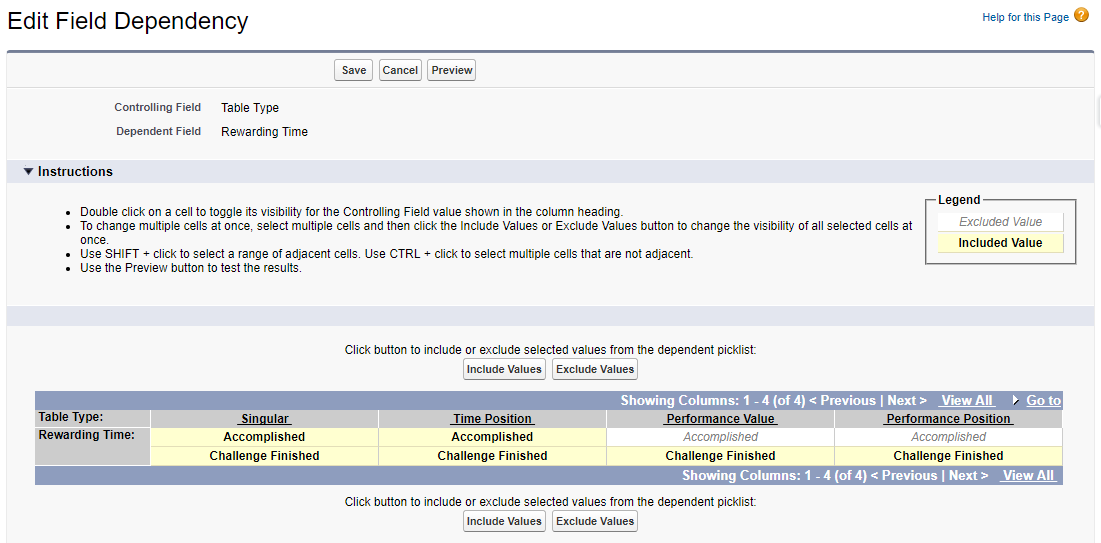
Field Dependency: Table Type <> Rewarding Time.
PLT: v2.37
Platform v2.37 requires to follow the steps below to upgrade a picklist value in Page Setting Type to render a new section for Mission form extension.
- From Setup, enter Objects in the Quick Find search box and click Object Manager. Scroll down to choose Page Settings object.
- Go to Custom Fields & relationships> Type.
- From Values> New, add the following values:
- Related - New.
PLT: v2.45
After installing Platform v2.45 package, follow the steps below to upgrade the next features:
Delete field, update Permission Sets and Profiles
- From Setup, enter Objects in the Quick Find search box and click Object Manager. Scroll down to choose Action object.
- Go to Custom Fields & relationships: Delete Developer Name.
If you are not able to delete the Developer Name field, as it's being currently used, you will need to create a new Field Update. For that, go to Salesforce Setup, quick find "Field Updates" and click on new field update. Use the Formula Value as follows:
TEXT(FieloPLT__RuleTrigger__r.FieloPLT__Object__c)
+
IF(NOT(ISBLANK(TEXT(FieloPLT__RuleTrigger__r.FieloPLT__ConditionField__c))), '.' + TEXT(FieloPLT__RuleTrigger__r.FieloPLT__ConditionField__c), '')
+
IF(NOT(ISBLANK(TEXT(FieloPLT__RuleTrigger__r.FieloPLT__ConditionValue__c))), '[' + TEXT(FieloPLT__RuleTrigger__r.FieloPLT__ConditionValue__c) + ']', '')
+
'>'
+
FieloPLT__TargetMember__c- After successfully deleting the field Developer Name, choose the Profiles/Permission Sets you want to give visibility to. For that, do the following:
a. Click Apps> Object Settings.
b. Give permission to External Id (FieloPLT__ExternalId__c) field in the following 25 objects:
- Action.
- Agreement.
- Badge.
- Challenge.
- Challenge Reward.
- Criterion.
- Criterion Group.
- Email Campaign.
- Email Template.
- Rule Trigger.
- KPI.
- KPI Domain.
- Level.
- Library.
- Mission.
- Model.
- Page Setting.
- Point Type.
- Program.
- Program Assignment.
- Program Point Type.
- Promotion.
- Reward.
- Rule.
- Segment.
c. Give permission to Export Resources (FieloPLT__ExportResources__c) field in the object Library.
d. Give permission to Custom (FieloPLT__IsCustom__c) field in the object Page Settings.
Complete Custom field in Page Settings
Run the following script to complete the field Custom (FieloPLT__IsCustom__c) in the object Page Settings.
List<FieloPLT__PageSettings__c> pageSettings = [SELECT Id, FieloPLT__IsCustom__c FROM FieloPLT__PageSettings__c];
for(FieloPLT__PageSettings__c p: pageSettings){
	p.FieloPLT__IsCustom__c = true;
}
update pageSettings;
Complete External IDs of FieloPLT Library
Run the following script to complete the field External Id (FieloPLT__ExternalId__c) of the records created by FieloPLT Library.
If an exception occurs, check the logs after executing the script. There's a debug that shows the exception message.
Savepoint sp = Database.setSavepoint();
try{
    FieloPLT__Library__c library = [SELECT Id, Name, FieloPLT__ExternalId__c FROM FieloPLT__Library__c WHERE Name = 'FieloPLT'];
    library.FieloPLT__ExternalId__c = 'FieloPLT';
    update library;

    //Update Page Settings External ID
    map<Id, FieloPLT__PageSettings__c> mapPageSettings = new map<Id, FieloPLT__PageSettings__c>([SELECT Id, Name, FieloPLT__Visibility__c, FieloPLT__ExternalId__c FROM FieloPLT__PageSettings__c WHERE FieloPLT__Library__r.Name = 'FieloPLT' ORDER BY Name]);
    for(FieloPLT__PageSettings__c p: mapPageSettings.values()){
		p.FieloPLT__ExternalId__c = 'FieloPLTPageSettings' + p.Name.replaceAll('[^a-zA-Z0-9]', '');

		String visibilityField;
		if(p.FieloPLT__Visibility__c != null){visibilityField = p.FieloPLT__Visibility__c.substringBetween('field":"', '"');}

		String visibilityValue;
		if(p.FieloPLT__Visibility__c != null){visibilityValue = p.FieloPLT__Visibility__c.substringBetween('value":"', '"');}

		if(visibilityField != null){p.FieloPLT__ExternalId__c += visibilityField.replace('FieloPLT__','').replace('__c','').replaceAll('[^a-zA-Z0-9]', '');}
		if(visibilityValue != null){p.FieloPLT__ExternalId__c += visibilityValue.replaceAll('[^a-zA-Z0-9]', '');}
    }
    update mapPageSettings.values();

	//Update Program Assignment External ID
	List<FieloPLT__ProgramAssignment__c> programAssignment = [SELECT Id, Name, FieloPLT__External_Id__c, FieloPLT__RecordType__c, FieloPLT__PageSettings__r.FieloPLT__ExternalId__c FROM FieloPLT__ProgramAssignment__c WHERE FieloPLT__PageSettings__c IN: mapPageSettings.keySet()];
    for(FieloPLT__ProgramAssignment__c pa: programAssignment){
		pa.FieloPLT__External_Id__c = pa.FieloPLT__PageSettings__r.FieloPLT__ExternalId__c.replace('FieloPLTPageSettings', 'FieloPLTProgramAssignment') + pa.FieloPLT__RecordType__c;
    }
    update programAssignment;

    //Update Action (Rule) Triggers External ID
    map<Id, FieloPLT__RuleTrigger__c> mapRuleTriggers = new map<Id, FieloPLT__RuleTrigger__c>([SELECT Id, Name, FieloPLT__ExternalId__c FROM FieloPLT__RuleTrigger__c WHERE FieloPLT__Library__r.Name = 'FieloPLT' AND Name = 'Event']);
    for(FieloPLT__RuleTrigger__c r: mapRuleTriggers.values()){
		r.FieloPLT__ExternalId__c = 'FieloPLTRuleTrigger' + r.Name;
    }
    update mapRuleTriggers.values();

    //Update Actions External ID
    List<FieloPLT__Action__c> actions = [SELECT Id, Name, FieloPLT__ExternalId__c FROM FieloPLT__Action__c WHERE FieloPLT__RuleTrigger__c IN: mapRuleTriggers.keySet()];
    for(FieloPLT__Action__c a: actions){
		a.FieloPLT__ExternalId__c = 'FieloPLTAction' + a.Name.replace(' ', '').replace('>', '');
    }
    update actions;

    //Update Point External ID. Only for 'Point' Point Type.
    List<FieloPLT__PointType__c> pt = [SELECT Id, FieloPLT__ExternalId__c FROM FieloPLT__PointType__c WHERE Name = 'Point' LIMIT 1];
    if(!pt.isEmpty()){
       pt[0].FieloPLT__ExternalId__c = 'FieloPoint';
       update pt;
    }

}catch(Exception e){
	system.debug('ERROR: ' + e.getMessage());
	Database.rollback(sp);
}
Upgrade FieloPLT Library
From Libraries, choose FieloPLT Library and click Upgrade.
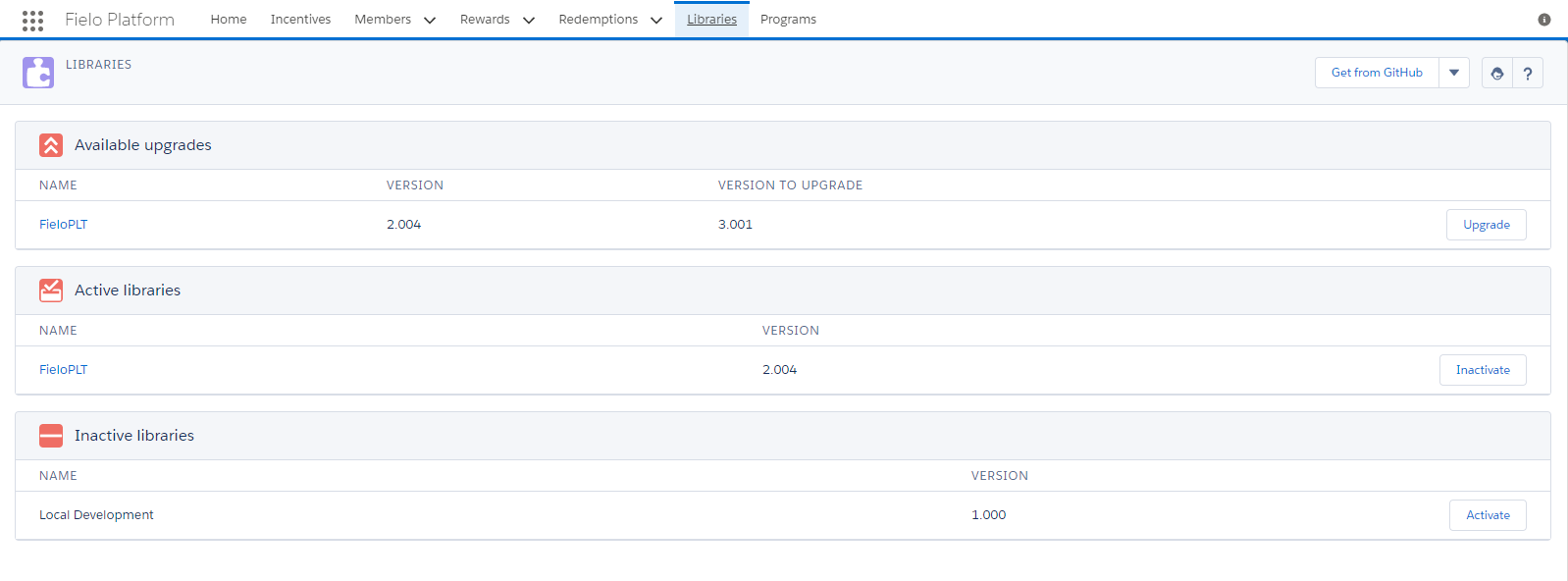
Upgrading FieloPLT Library
You'll notice that FieloPLT Library Version number changes to the newly upgraded version and the Available Upgrade related list is no longer visible.
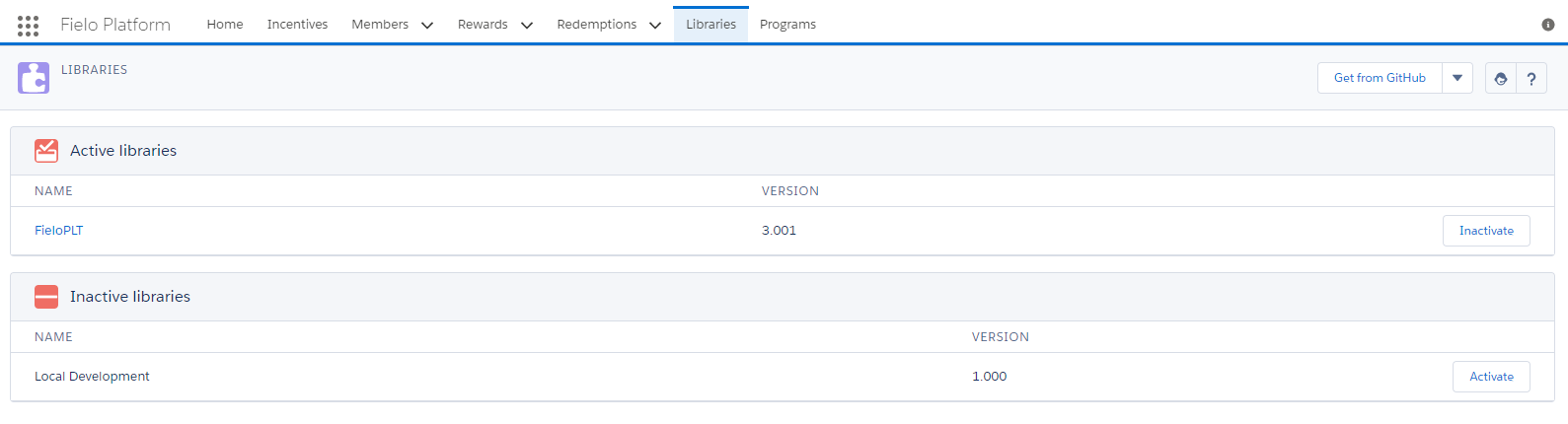
FieloPLT Library Upgraded
Enable Fielo Local Library
From Libraries, enable FieloLocal. By doing so, you create a new Library- FieloLocal - which includes all the Actions, Models and Page Settings previously created in Local Development.
Complete External IDs of Platform
The last step you need to carry out is to complete the field External Id (FieloPLT__ExternalId__c) of every record of Platform objects.
PLT: v2.47
Platform v2.47 requires that the following script be run on Salesforce Developer Console after installing v2.47 to set default Tracker Mode in Challenges as Stored.
List<FieloPLT__Challenge__c> challenges = [Select Id, FieloPLT__TrackerMode__c From FieloPLT__Challenge__c where FieloPLT__TrackerMode__c = null ];
for(FieloPLT__Challenge__c c : challenges){
c.FieloPLT__TrackerMode__c = 'Stored';
}
update challenges;
When upgrading from PLT v2.45 or higher, delete the following fields from Email Alert (FieloPLT__EmailAlert__c):
- Challenge Member Custom (
FieloPLT__Challenge_Member_Custom__c). - Member Custom (
FieloPLT__Member_Custom__c). - Point Custom (
FieloPLT__Challenge_Member_Custom__c).
PLT: v2.49
Platform v2.49 requires that the following scripts be run on Salesforce Workbench after installing v2.49 to update existing Transactions and to add and populate their Rewarding Summary field.
ProfileIf you are using a Profile other than System Administrator, give access to Transaction and Rewarding Summary field as follows:
From Setup, enter Profiles on the Quick Find search box.
Choose the Profiles you want to give visibility to.
- Click Apps> Object Settings.
- Choose Transactions. In Object Permissions, set the following:
Object Permission Name Transactions Enable Create, Edit and Delete permissions if you need the Profile to also create, modify and/or delete Page Settings.
- In Field Permissions, tick all Read Access and Edit Access (if available) checkboxes for the following fields:
- Rewarding Summary.
Create a Salesforce Document
The following script creates FieloPLT__TransactionMigrationIds, which includes the first and last Transaction IDs for every 2,000 Transaction batch. E.g. First Batch: From Transaction ID=1 to Transaction ID= 2000; Second Batch: From Transaction ID= 2001 to Transaction ID=4000. FieloPLT__TransactionMigrationIds is saved in Fielo Images folder.
Configurable Batch SizeYou can set the Transaction batch size from 0 to 10,000 records per batch. Depending on how much data Transaction processes (i.e. Triggers, Workflows, Validation Rules, etc.), you should decrease or increase the batch size number.
//Document is created including the first and last Transaction records ID.
List<FieloPLT__Transaction__c> transactions = [SELECT Id FROM FieloPLT__Transaction__c order by id];
Integer i = 0;
String dcBody = '';
Integer batchSize = 2000;
for ( FieloPLT__Transaction__c t : transactions ) {
	//"Mod" represents Transactions batch size (2,000 records/batch).
   if ( Math.mod( i, batchSize ) == 0 ) {
        dcBody += String.valueOf(t.Id) +',';
   }
   i++;
}

dcBody = dcBody.removeEnd(',');
Folder f = [SELECT DeveloperName,Id FROM Folder Where name = 'Fielo Images' limit 1];
Document doc = new Document();
//Save Document
doc.Name = 'FieloPLT__TransactionMigrationIds';
doc.body = blob.valueof(dcBody);
doc.folderid = f.Id;
doc.IsPublic = true;
upsert doc;
Process Transaction IDs
Once you've created FieloPLT__TransactionMigrationIds including the first and last Transaction IDs for every 2,000 Transaction batch, run the following script until all the Transaction batches are processed.
Make sure you run the script until you get the message: EXCEPTION: FieloPLT.FieloException: All records were updated.
List<Id> migrationIds = new List<Id>();
List<Document> documents = [SELECT Id, Body FROM Document WHERE Name = 'FieloPLT__TransactionMigrationIds' limit 1];
if( documents.size() > 0 ){
    String dcBody = documents[0].body.tostring();
    if( !String.isEmpty(dcBody) ){
        migrationIds = dcBody.split(',');
    }else{
        throw new FieloPLT.FieloException('All records were updated.');
    }
}

Id lowestId = migrationIds.get(0);
Id highestId = null;
//Transactions from Rules and Challenge Rewards
String query = 'SELECT Id, FieloPLT__RewardingSummary__c, FieloPLT__Member__c, (SELECT Id, Name, FieloPLT__Balance__c, FieloPLT__Member__c, FieloPLT__Rule__c, FieloPLT__ChallengeReward__c, FieloPLT__PointType__c, FieloPLT__Status__c, FieloPLT__Transaction__c ,FieloPLT__TotalPoints__c ,FieloPLT__UsedPoints__c FROM FieloPLT__Points__r), (SELECT Id, FieloPLT__Description__c, FieloPLT__Member__c, FieloPLT__Rule__c, FieloPLT__ChallengeReward__c, FieloPLT__Status__c, FieloPLT__Transaction__c FROM FieloPLT__Redemptions__r), (SELECT Id, Name, FieloPLT__Badge__c, FieloPLT__Rule__c, FieloPLT__ChallengeReward__c, FieloPLT__Member__c, FieloPLT__Quantity__c, FieloPLT__Status__c FROM FieloPLT__BadgesMembers__r) FROM FieloPLT__Transaction__c WHERE Id >=: lowestId ';

if( migrationIds.size() > 1 ){
    highestId = migrationIds.get(1);
    query += 'AND Id <: highestId';
}
List<FieloPLT__Transaction__c> transactions = Database.query(query);

Set<Id> memberIds = new Set<Id>();
Set<Id> transactionsProcessedIds = new Set<Id>();
for(FieloPLT__Transaction__c t : transactions){
    memberIds.add(t.FieloPLT__Member__c);
    transactionsProcessedIds.add(t.Id);
}

Boolean hasRules = [Select Id from FieloPLT__Rule__c limit 1].size() > 0 ? true : false;
Boolean hasCHR = [Select Id from FieloPLT__ChallengeReward__c limit 1].size() > 0 ? true : false;

//Searches Rules
Map<Id, FieloPLT__Rule__c> rulesMap;
if( hasRules ){
    Map<String, Schema.SObjectField> ruleFieldsMap = Schema.SObjectType.FieloPLT__Rule__c.fields.getMap();
    String queryRules = 'SELECT ';
    for (String fieldName: ruleFieldsMap.keySet()) {
        queryRules += ','+fieldName;
    }
    queryRules = queryRules.replaceFirst(',','');
    queryRules += ' FROM FieloPLT__Rule__c';
    rulesMap = new Map<Id, FieloPLT__Rule__c>( (List<FieloPLT__Rule__c>)Database.query(queryRules));
}

//Searches Challenge Rewards
Map<Id, FieloPLT__ChallengeReward__c> challengeRewardsMap;
if( hasCHR ){
    Map<String, Schema.SObjectField> challengeRewardFieldsMap = Schema.SObjectType.FieloPLT__ChallengeReward__c.fields.getMap();
    String queryCHRewards = 'SELECT ';
    for (String fieldName: challengeRewardFieldsMap.keySet()) {
        queryCHRewards += ','+fieldName;
    }
    queryCHRewards = queryCHRewards.replaceFirst(',','');
    queryCHRewards += ' FROM FieloPLT__ChallengeReward__c';
    challengeRewardsMap = new Map<Id, FieloPLT__ChallengeReward__c>((List<FieloPLT__ChallengeReward__c>)Database.query(queryCHRewards));
}
Map<Id, FieloPLT__PointType__c> pointTypesMap = new Map<Id, FieloPLT__PointType__c>( [SELECT Id, Name FROM FieloPLT__PointType__c] );
Map<Id, FieloPLT__Member__c> membersMap = new Map<Id, FieloPLT__Member__c>( [SELECT Id, FieloPLT__Program__c FROM FieloPLT__Member__c WHERE Id In: memberIds]);
for(FieloPLT__Transaction__c t : transactions){
    //Transaction JSON file
    Map<String, Map<String,Sobject>> rewardingJSON = new Map<String, Map<String,Sobject>>();
    if( String.isBlank(t.FieloPLT__RewardingSummary__c) ){
        Map<Id, String> reflectionClasses = new Map<Id, String>();
        //Adds Points to the JSON file
        for(FieloPLT__Point__c p : t.FieloPLT__Points__r ){
            //For Rules
            if( p.FieloPLT__Rule__c != null ){
                if( rewardingJSON.containsKey( String.valueOf(rulesMap.get(p.FieloPLT__Rule__c).Name) ) ){
                    rewardingJSON.get( String.valueOf(rulesMap.get(p.FieloPLT__Rule__c).Name) ).put( String.valueOf( pointTypesMap.get(p.FieloPLT__PointType__c).Name), p );
                } else {
                    Map<String,SObject> aux = new Map<String,SObject>();
                    aux.put( 'rule', rulesMap.get(p.FieloPLT__Rule__c) );
                    aux.put( String.valueOf( pointTypesMap.get(p.FieloPLT__PointType__c).Name), p );
                    rewardingJSON.put(String.valueOf(rulesMap.get(p.FieloPLT__Rule__c).Name), aux );
                }
                //If there's a Reflection Class, enter it in "reflectionClasses"
                if( String.isNotBlank(rulesMap.get(p.FieloPLT__Rule__c).FieloPLT__RewardDeliveryClass__c) ){
                    reflectionClasses.put(p.FieloPLT__Rule__c, rulesMap.get(p.FieloPLT__Rule__c).FieloPLT__RewardDeliveryClass__c);
                }
            } else if( p.FieloPLT__ChallengeReward__c != null ){

                //For Challenge Reward
                if( rewardingJSON.containsKey( String.valueOf(challengeRewardsMap.get(p.FieloPLT__ChallengeReward__c).Name) ) ){
                    rewardingJSON.get( String.valueOf(challengeRewardsMap.get(p.FieloPLT__ChallengeReward__c).Name) ).put( String.valueOf( pointTypesMap.get(p.FieloPLT__PointType__c).Name), p );
                } else {
                    Map<String,SObject> aux = new Map<String,SObject>();
                    aux.put( 'challengeReward', challengeRewardsMap.get(p.FieloPLT__ChallengeReward__c) );
                    aux.put( String.valueOf( pointTypesMap.get(p.FieloPLT__PointType__c).Name), p );
                    rewardingJSON.put(String.valueOf(challengeRewardsMap.get(p.FieloPLT__ChallengeReward__c).Name), aux );
                }
                //If there's a Reflection Class, enter it in "reflectionClasses"
                if( String.isNotBlank(challengeRewardsMap.get(p.FieloPLT__ChallengeReward__c).FieloPLT__RewardDeliveryClass__c) ){
                    reflectionClasses.put(p.FieloPLT__ChallengeReward__c, challengeRewardsMap.get(p.FieloPLT__ChallengeReward__c).FieloPLT__RewardDeliveryClass__c);
                }
            } else {

              //For Adjust Transactions
                if( rewardingJSON.containsKey( 'adjust' ) ){
                    rewardingJSON.get( 'adjust' ).put( String.valueOf( pointTypesMap.get(p.FieloPLT__PointType__c).Name), p );
                } else {
                    Map<String,SObject> aux = new Map<String,SObject>();
                    aux.put( String.valueOf( pointTypesMap.get(p.FieloPLT__PointType__c).Name), p );
                    rewardingJSON.put('adjust', aux );
                }
            }
        }

        //Adds Redemption to JSON file
        for(FieloPLT__Redemption__c r : t.FieloPLT__Redemptions__r ){
            //For Rules
            if( r.FieloPLT__Rule__c != null ){
                if( rewardingJSON.containsKey( String.valueOf(rulesMap.get(r.FieloPLT__Rule__c).Name) ) ){
                    rewardingJSON.get( String.valueOf(rulesMap.get(r.FieloPLT__Rule__c).Name) ).put( 'redemption', r );
                } else {
                    Map<String,SObject> aux = new Map<String,SObject>();
                    aux.put( 'rule', rulesMap.get(r.FieloPLT__Rule__c) );
                    aux.put( 'redemption', r );
                    rewardingJSON.put(String.valueOf(rulesMap.get(r.FieloPLT__Rule__c).Name), aux );
                }

                //If there's a Reflection Class, enter it in "reflectionClasses"
                if( String.isNotBlank(rulesMap.get(r.FieloPLT__Rule__c).FieloPLT__RewardDeliveryClass__c) ){
                    reflectionClasses.put(r.FieloPLT__Rule__c, rulesMap.get(r.FieloPLT__Rule__c).FieloPLT__RewardDeliveryClass__c);
                }
            } else if( r.FieloPLT__ChallengeReward__c != null ){
                if( rewardingJSON.containsKey( String.valueOf(challengeRewardsMap.get(r.FieloPLT__ChallengeReward__c).Name) ) ){
                    rewardingJSON.get( String.valueOf(challengeRewardsMap.get(r.FieloPLT__ChallengeReward__c).Name) ).put( 'redemption', r );
                } else {
                    Map<String,SObject> aux = new Map<String,SObject>();
                    aux.put( 'challengeReward', challengeRewardsMap.get(r.FieloPLT__ChallengeReward__c) );
                    aux.put( 'redemption', r );
                    rewardingJSON.put(String.valueOf(challengeRewardsMap.get(r.FieloPLT__ChallengeReward__c).Name), aux );
                }

                //If there's a Reflection Class, enter it in "reflectionClasses"
                if( String.isNotBlank(challengeRewardsMap.get(r.FieloPLT__ChallengeReward__c).FieloPLT__RewardDeliveryClass__c) ){
                    reflectionClasses.put(r.FieloPLT__ChallengeReward__c, challengeRewardsMap.get(r.FieloPLT__ChallengeReward__c).FieloPLT__RewardDeliveryClass__c);
                }
            }
        }

        //Adds Badge Members to JSON file
        for(FieloPLT__BadgeMember__c bm : t.FieloPLT__BadgesMembers__r){
            //For Rules
            if( bm.FieloPLT__Rule__c != null ){
                if( rewardingJSON.containsKey( String.valueOf(rulesMap.get(bm.FieloPLT__Rule__c).Name) ) ){
                    rewardingJSON.get( String.valueOf(rulesMap.get(bm.FieloPLT__Rule__c).Name) ).put( 'badgeMember', bm );
                } else {
                    Map<String,SObject> aux = new Map<String,SObject>();
                    aux.put( 'rule', rulesMap.get(bm.FieloPLT__Rule__c) );
                    aux.put( 'badgeMember', bm );
                    rewardingJSON.put(String.valueOf(rulesMap.get(bm.FieloPLT__Rule__c).Name), aux );
                }

                //If there's a Reflection Class, enter it in "reflectionClasses"
                if( String.isNotBlank(rulesMap.get(bm.FieloPLT__Rule__c).FieloPLT__RewardDeliveryClass__c) ){
                    reflectionClasses.put(bm.FieloPLT__Rule__c, rulesMap.get(bm.FieloPLT__Rule__c).FieloPLT__RewardDeliveryClass__c);
                }
            } else if( bm.FieloPLT__ChallengeReward__c != null ){
                if( rewardingJSON.containsKey( String.valueOf(challengeRewardsMap.get(bm.FieloPLT__ChallengeReward__c).Name) ) ){
                    rewardingJSON.get( String.valueOf(challengeRewardsMap.get(bm.FieloPLT__ChallengeReward__c).Name) ).put( 'badgeMember', bm );
                } else {
                    Map<String,SObject> aux = new Map<String,SObject>();
                    aux.put( 'challengeReward', challengeRewardsMap.get(bm.FieloPLT__ChallengeReward__c) );
                    aux.put( 'badgeMember', bm );
                    rewardingJSON.put(String.valueOf(challengeRewardsMap.get(bm.FieloPLT__ChallengeReward__c).Name), aux );
                }

                //If there's a Reflection Class, enter it in "reflectionClasses"
                if( String.isNotBlank(challengeRewardsMap.get(bm.FieloPLT__ChallengeReward__c).FieloPLT__RewardDeliveryClass__c) ){
                    reflectionClasses.put(bm.FieloPLT__ChallengeReward__c, challengeRewardsMap.get(bm.FieloPLT__ChallengeReward__c).FieloPLT__RewardDeliveryClass__c);
                }
            }
        }

        //Adds Reflection Class
        for(Id keyId : reflectionClasses.keySet()){
            String reflection = reflectionClasses.get(keyId);
            //For Rules
            if( rulesMap.containsKey(keyId) ){
                if( rewardingJSON.containsKey( String.valueOf(rulesMap.get(keyId).Name) ) ){
                    rewardingJSON.get( String.valueOf(rulesMap.get(keyId).Name) ).put( String.valueOf(reflection), null );
                } else {
                    rewardingJSON.put( String.valueOf(rulesMap.get(keyId).Name), new Map<String, Sobject>{ String.valueOf(reflection) => null} );
                }
            } else if( challengeRewardsMap.containsKey(keyId) ){
                //For Challenge Rewards
                if( rewardingJSON.containsKey( String.valueOf(challengeRewardsMap.get(keyId).Name) ) ){
                    rewardingJSON.get( String.valueOf(challengeRewardsMap.get(keyId).Name) ).put( String.valueOf(reflection), null );
                } else {
                    rewardingJSON.put( String.valueOf(challengeRewardsMap.get(keyId).Name), new Map<String, Sobject>{ String.valueOf(reflection) => null} );
                }
            }
        }

        t.FieloPLT__RewardingSummary__c = JSON.serialize(rewardingJSON);
    }
}

fieloplt.SobjectService.enableAdminPermission(true);
update transactions;

//Updates Transaction Migration Document
migrationIds.remove(0);
if(!migrationIds.isEmpty()){
	String newMigrationIds = String.Join(migrationIds, ',');
	documents[0].body = blob.valueof(newMigrationIds);
	upsert documents;
}else{
	documents[0].body =  null;
	upsert documents;
}
Delete Salesforce Document
After you've finished processing all Transactions, run the following script to delete FieloPLT__TransactionMigrationIds
delete [Select id from Document where Name = 'FieloPLT__TransactionMigrationIds'];PLT: v2.51 (G.A.)
Platform v2.51 requires that the following scripts be run on Salesforce Developer Console after installing v2.51 to update FieloPLT Library.
Upgrade FieloPLT Library
To upgrade the FieloPLT Library to the latest version, just follow the steps in Upgrading Libraries.
Remove picklist value
Remove a picklist value from Standard Actions in Page Settings:
- From Setup, enter Objects in the Quick Find search box and click Object Manager. Scroll down to choose Page Settings object.
- Go to Fields & Relationships> Standard Actions
- Scroll down to Values section and delete Approve value. In case there are records containing that value, choose the option Replace value on records with:Settings. .
- Click Save.
Enable new Page Settings
Run the following script to enable the new Page Settings added to the FieloPLT Library.
Set<String> externalIds = new Set<String>();
externalIds.add('FieloPLTPageSettingsChallengeMemberNew');
externalIds.add('FieloPLTPageSettingsChallengeRelatedChallengeMember');
externalIds.add('FieloPLTPageSettingsChallengeRelatedChallengeReward');
externalIds.add('FieloPLTPageSettingsChallengeRewardEdit');
externalIds.add('FieloPLTPageSettingsMissionDetailWithDynamicObjective');
externalIds.add('FieloPLTPageSettingsMissionDetailWithoutDynamicObjective');
externalIds.add('FieloPLTPageSettingsModelDetail');
externalIds.add('FieloPLTPageSettingsModelEdit');
externalIds.add('FieloPLTPageSettingsModelRelatedProgramAssignment');
externalIds.add('FieloPLTPageSettingsProgramAssignmentEdit');
externalIds.add('FieloPLTPageSettingsRuleDetailForMultiplierAndFactor');
externalIds.add('FieloPLTPageSettingsRuleDetailNotForMultiplierAndFactor');
externalIds.add('FieloPLTPageSettingsRuleDetailWithBadge');
externalIds.add('FieloPLTPageSettingsRuleDetailWithReward');
List<FieloPLT__PageSettings__c> pageSettings = [SELECT Id, FieloPLT__IsActive__c FROM FieloPLT__PageSettings__c WHERE FieloPLT__ExternalId__c IN: externalIds AND FieloPLT__IsActive__c = false];
for(FieloPLT__PageSettings__c ps: pageSettings){
ps.FieloPLT__IsActive__c = true;
}
update pageSettings;
Update Custom Page Settings (Optional)
If you're applying custom Page Settings to some page layouts, or if you don't use default Libraries Page Settings, go through the following script.
Run the following script to update custom Page Settings:
Set<String> externalIds = new Set<String>();
externalIds.add('FieloPLTPageSettingsChallengeRelatedMission');
externalIds.add('FieloPLTPageSettingsChallengeLanding');
externalIds.add('FieloPLTPageSettingsPromotionLanding');
externalIds.add('FieloPLTPageSettingsPromotionRelatedRule');
externalIds.add('FieloPLTPageSettingsProgramRelatedLevel');
externalIds.add('FieloPLTPageSettingsMemberRelatedRedemption');
externalIds.add('FieloPLTPageSettingsMemberSegmentEdit');
externalIds.add('FieloPLTPageSettingsSegmentDynamicRelatedMemberSegment');

List<FieloPLT__PageSettings__c> records = new List<FieloPLT__PageSettings__c>();

//Adds Standard Action "New" to both Challenge and Promotion Landing page.
for(FieloPLT__PageSettings__c record: [SELECT Id, FieloPLT__StandardActions__c FROM FieloPLT__PageSettings__c WHERE FieloPLT__IsActive__c = true AND FieloPLT__ExternalId__c NOT IN: externalIds AND FieloPLT__Type__c = 'Landing' AND FieloPLT__Object__c IN ('FieloPLT__Challenge__c','FieloPLT__Promotion__c')]){
	if(string.isBlank(record.FieloPLT__StandardActions__c)){
		record.FieloPLT__StandardActions__c = 'New';
	}else{
		if(!record.FieloPLT__StandardActions__c.contains('New')){
			record.FieloPLT__StandardActions__c += ';New';
		}
	}
	records.add(record);
}
//Adds Standard Actions "New", "Edit" and "Delete" to Mission Related list on the Challenge View page and Rules Related list on the Promotion View page.
for(FieloPLT__PageSettings__c record: [SELECT Id, FieloPLT__StandardActions__c, FieloPLT__Object__c, FieloPLT__TargetObject__c, FieloPLT__TargetField__c FROM FieloPLT__PageSettings__c WHERE FieloPLT__IsActive__c = true AND FieloPLT__ExternalId__c NOT IN: externalIds AND FieloPLT__Type__c = 'Related' AND FieloPLT__Object__c IN ('FieloPLT__Challenge__c','FieloPLT__Promotion__c') AND FieloPLT__TargetObject__c IN ('FieloPLT__Mission__c','FieloPLT__Rule__c') AND FieloPLT__TargetField__c IN ('FieloPLT__Challenge__c','FieloPLT__Promotion__c')]){
	if((record.FieloPLT__Object__c == 'FieloPLT__Challenge__c' && record.FieloPLT__TargetObject__c == 'FieloPLT__Mission__c' && record.FieloPLT__TargetField__c == 'FieloPLT__Challenge__c') || (record.FieloPLT__Object__c == 'FieloPLT__Promotion__c' && record.FieloPLT__TargetObject__c == 'FieloPLT__Rule__c' && record.FieloPLT__TargetField__c == 'FieloPLT__Promotion__c')){
		if(string.isBlank(record.FieloPLT__StandardActions__c)){
			record.FieloPLT__StandardActions__c = 'New;Edit;Delete';
		}else{
			if(!record.FieloPLT__StandardActions__c.contains('New')){
				record.FieloPLT__StandardActions__c += ';New';
			}
			if(!record.FieloPLT__StandardActions__c.contains('Edit')){
				record.FieloPLT__StandardActions__c += ';Edit';
			}
			if(!record.FieloPLT__StandardActions__c.contains('Delete')){
				record.FieloPLT__StandardActions__c += ';Delete';
			}
		}
		records.add(record);
	}
}
//Adds Standard Actions "New" to Levels Related list on Program View page and Redemptions Related list on Member View page.
for(FieloPLT__PageSettings__c record: [SELECT Id, FieloPLT__StandardActions__c, FieloPLT__Object__c, FieloPLT__TargetObject__c, FieloPLT__TargetField__c FROM FieloPLT__PageSettings__c WHERE FieloPLT__IsActive__c = true AND FieloPLT__ExternalId__c NOT IN: externalIds AND FieloPLT__Type__c = 'Related' AND FieloPLT__Object__c IN ('FieloPLT__Program__c','FieloPLT__Member__c') AND FieloPLT__TargetObject__c IN ('FieloPLT__Level__c','FieloPLT__Redemption__c') AND FieloPLT__TargetField__c IN ('FieloPLT__Program__c','FieloPLT__Member__c')]){
	if((record.FieloPLT__Object__c == 'FieloPLT__Program__c' && record.FieloPLT__TargetObject__c == 'FieloPLT__Level__c' && record.FieloPLT__TargetField__c == 'FieloPLT__Program__c') || (record.FieloPLT__Object__c == 'FieloPLT__Member__c' && record.FieloPLT__TargetObject__c == 'FieloPLT__Redemption__c' && record.FieloPLT__TargetField__c == 'FieloPLT__Member__c')){
		if(string.isBlank(record.FieloPLT__StandardActions__c)){
			record.FieloPLT__StandardActions__c = 'New';
		}else{
			if(!record.FieloPLT__StandardActions__c.contains('New')){
				record.FieloPLT__StandardActions__c += ';New';
			}
		}
		records.add(record);
	}
}
//Removes default section on the Member Segment Edit page. Only applicable to Manual Segment View page, on Member Segment Related list.
for(FieloPLT__PageSettings__c record: [SELECT Id, FieloPLT__Sections__c FROM FieloPLT__PageSettings__c WHERE FieloPLT__IsActive__c = true AND FieloPLT__ExternalId__c NOT IN: externalIds AND FieloPLT__Type__c = 'Edit' AND FieloPLT__Object__c = 'FieloPLT__MemberSegment__c']){
	record.FieloPLT__Sections__c = null;
	records.add(record);
}
//Modifies Target Object, Name and Fieldset on Segment Related list. Only applicable to Dynamic Segments View page.
for(FieloPLT__PageSettings__c record: [SELECT Id, Name, FieloPLT__TargetObject__c, FieloPLT__FieldSet__c, (SELECT Id, FieloPLT__RecordType__c FROM FieloPLT__PageSettingsAssignments__r WHERE FieloPLT__RecordType__c = 'Dynamic') FROM FieloPLT__PageSettings__c WHERE FieloPLT__IsActive__c = true AND FieloPLT__ExternalId__c NOT IN: externalIds AND FieloPLT__Type__c = 'Related' AND FieloPLT__Object__c = 'FieloPLT__Segment__c' AND FieloPLT__TargetObject__c = 'FieloPLT__MemberSegment__c' AND FieloPLT__TargetField__c = 'FieloPLT__Segment__c']){
	if(!record.FieloPLT__PageSettingsAssignments__r.isEmpty()){
		record.Name = record.Name.replace('Member Segment','Member');
		record.FieloPLT__TargetObject__c = 'FieloPLT__Member__c';
		record.FieloPLT__FieldSet__c = '{"Name":"FieloPLT__Type__c"}';
		records.add(record);
	}
}

if(!records.isEmpty()){
	update records;
	system.debug('RECORDS UPDATED SUCCESFULLY.');
}else{
	system.debug('NO RECORDS TO UPDATE.');
}
Updated over 1 year ago