
Overview
You need to see how your incentives and loyalty strategy is performing in real time. Fielo Analytics makes it easy to create rich, criteria-based program reports where your key performance indicators are front and center. Get clear visibility on member onboarding, incentive performance, engagement stats, and lots more.
Analytics is built directly on Salesforce, so it uses the wealth of information Salesforce puts at your fingertips—from real-time snapshots of your business to yearly summaries. An independent survey of more than 4,000 Salesforce customers found that these analytics were able to cut the time people needed to prepare Reports by an average of 52 percent.
By always knowing where you stand, you can spot trends early and make the best decisions for your business.
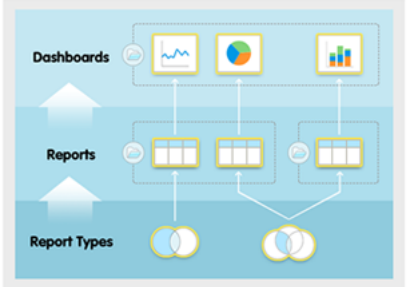
Salesforce's analytics model
How Salesforce and Analytics Work Together
Fielo Analytics leverages Salesforce Reports and Dashboards to offer a complete view of your program performance and nearly endless flexibility to extend your own custom reports.
Reports and dashboards in Salesforce can be summed up in just two sentences:
Report types are the templates from which users build reports, which organize data and are shared via folders. Reports are also the source for dashboard components, which visually display data in dashboards.
Report Types
A report type defines the set of records and fields available to a report based on the relationships between a primary object and its related objects. Reports display only records that meet the criteria defined in the report type.
Reports
A report returns a set of records that meet certain criteria and displays it in organized rows and columns. Report data can be filtered, grouped, and displayed graphically as a chart. Reports are stored in folders.
Dashboards
Dashboards offer quick, high-level visualizations of your data.
Folders
Folders are where you store reports and dashboards. You can control access to reports and dashboards by storing them in folders with restricted visibility settings. Folders can be public, hidden, or limited to specific groups, roles, or territories.

Making a Fielo-Enhanced Report
- Create a Salesforce report.
- Make a KPI to highlight a key objective you want to reach in your overall Program or individual Promotions and Challenges.
- Add your KPI to an existing Program, Promotion or Challenge to display a complete report.
- Get a full view of what matters most by configuring dashboards.
Updated over 1 year ago