
Provider Orders
You can use Provider Orders to keep track of Redemption Items that are being fulfilled by an external Provider, such as Amazon. A single Provider Order tracks all Redemption Items being fulfilled by a Provider in a given Redemption.
To enable Provider Orders, you'll need to add the Provider Order > Name field to your Redemption > Related > Redemption Item page settings. If you've not yet customized this page, you'll have to clone the default Page Settings first and then add the Provider Order > Name field to your custom Page Settings. For more information on configuring Page Settings, see our doc.
Once you've enabled Provider Orders, you'll be able to see the Provider Order column in your Redemption Items list.
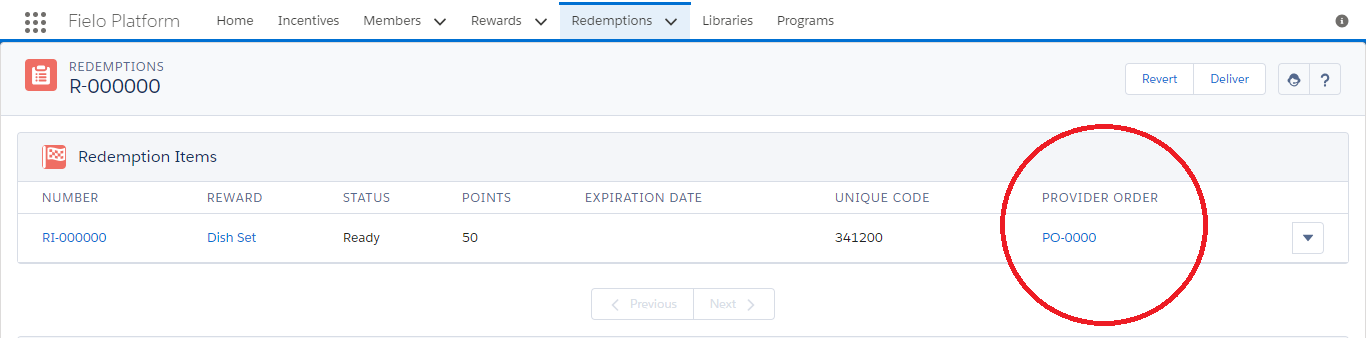
When clicking on the Provider Order name (e.g. PO-0000), you'll have read and edit access to the following data:
- Provider: the Salesforce Account of the external provider.
- Redemption: the Redemption corresponding to the order.
- Status: the status of the externally-fulfilled order. This could be Open, Delivered or Closed.
- Delivered Date: the date the order was marked as Delivered.
Updated over 1 year ago