
My Transactions
My Transactions lists all of a member's transactions.
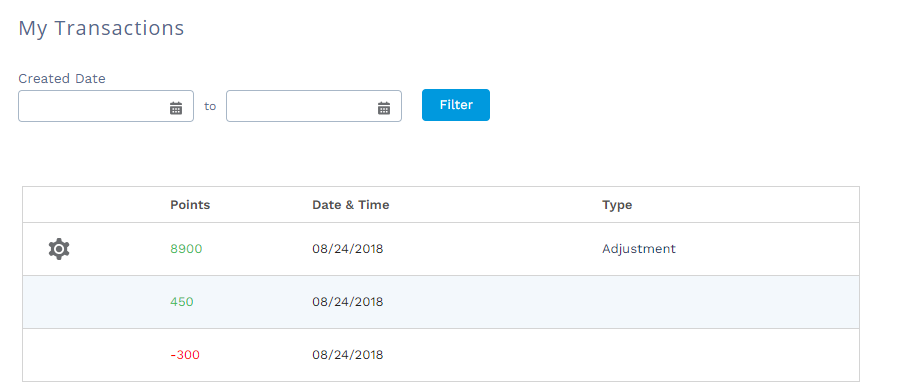
Configuring My Transactions
Once you've added Member Selector and My Transactions to your page, you can customize what data is shown and how it is shown.
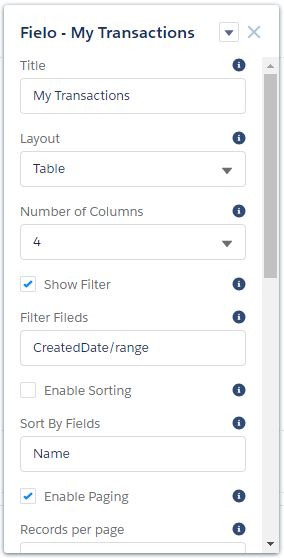
My Transactions can be configured via the following properties:
- Title: Enter the title you want displayed at the top of the component.
- Layout: Choose Table to display transactions in list format or Grid to display them in tile format.
- Number of Columns: If using grid layout, choose the number of columns to be displayed.
- Show Filter: Check this box to allow members to filter transactions by date.
- Filter Fields: Enter the API names of fields you want to use for transaction filtering, separated by commas. Created date is included by default.
- Enable Sorting: Check this box to allow members to sort their transactions.
- Sort By Fields: If sorting is enabled, enter the API names of the fields you want members to be able to sort by, separated by commas.
- Enable Paging: Check this box to allow transactions to be displayed in pages.
- Records per Page: If paging is enabled, enter the maximum number of transactions to be displayed per page.
- Fieldset: Enter the API names of the fields that you want to be displayed in the transaction list, separated by commas. Points earned or deducted, transaction date and transaction type are included by default.
Updated over 1 year ago
Did this page help you?