
Outcomes
The Outcomes section will give you all the tools necessary to create and manage levels and redemptions within your program. Below is an overview of what you can expect to find within the Outcomes tab.
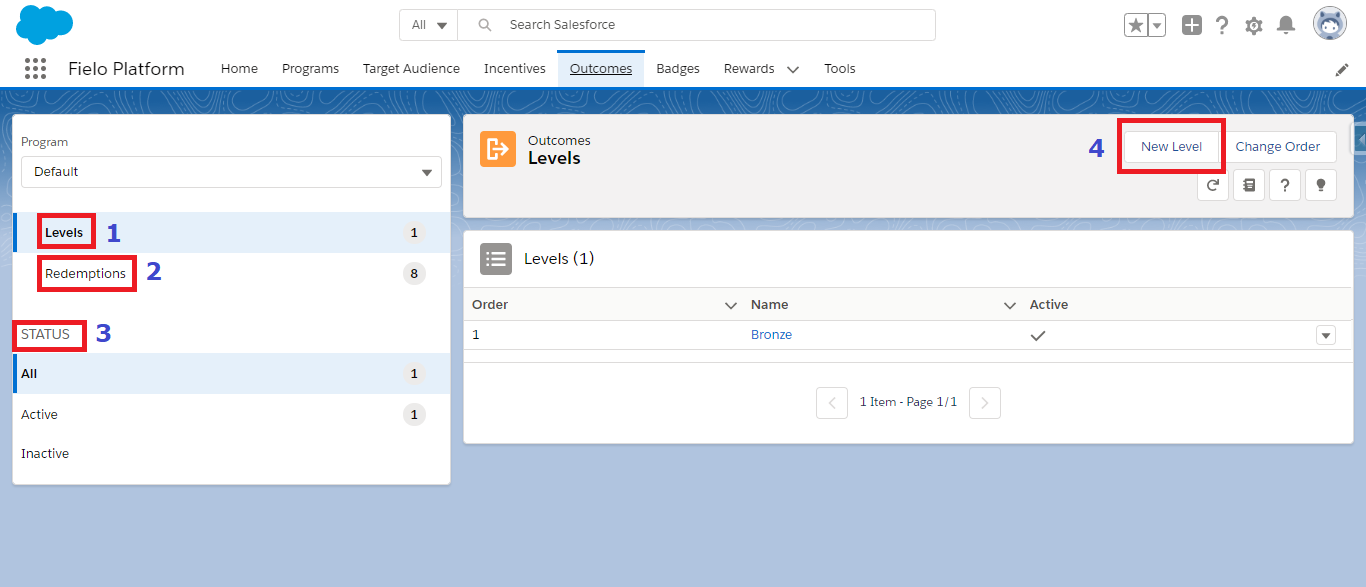
Levels
Levels rank members by including them into different groups (e.g. Bronze, Silver, Gold). Members can influence their level by engaging with the program and performing incentivized behaviors.
Redemptions
Redemptions are the orders generated by members when they redeem their available rewards. They include one or more redemption items, which represent each item that is part of a redemption order.
Status
This area will divide your levels and redemptions by their statuses. For example, while you are in Levels, the Status section will show All, Active, and Inactive. Redemptions will have its own status that will be displayed in this section.
Create a new Outcome
This button will allow you to create a new Level or Redemption, depending on which section you are in. As you scroll through the 2 options, you will also notice the button text will change to help you know what you will actually be creating.
Updated over 1 year ago