
Advanced Team Configurations
Asynchronous Process
If you have teams with an unusually large amount of members in it, you may reach Salesforce’s processing limits when rewarding or reverting transactions, as well as using Promote Rank.
Asynchronous Process guarantees Fielo won’t exceed this limit by breaking down the data into smaller, manageable blocks that will be handled separately, therefore ensuring all data gets processed and every member on the team has their rewards successfully delivered.
Presuming that you have upgraded to Winter '20 from any previous version of Fielo, follow the steps below to create an Asynchronous Process. Otherwise, if you installed it on a brand new Salesforce Org, Asynchronous Process comes pre configured and you'll only need to edit it (Set Up > Custom Settings > Async Process > Manage > Edit).
Creating an Asynchronous Processes
To create an Asynchronous Processes and edit its parameters, start by going to Set Up.
Look for Custom Settings and find Async Process. Hit Manage and then New.
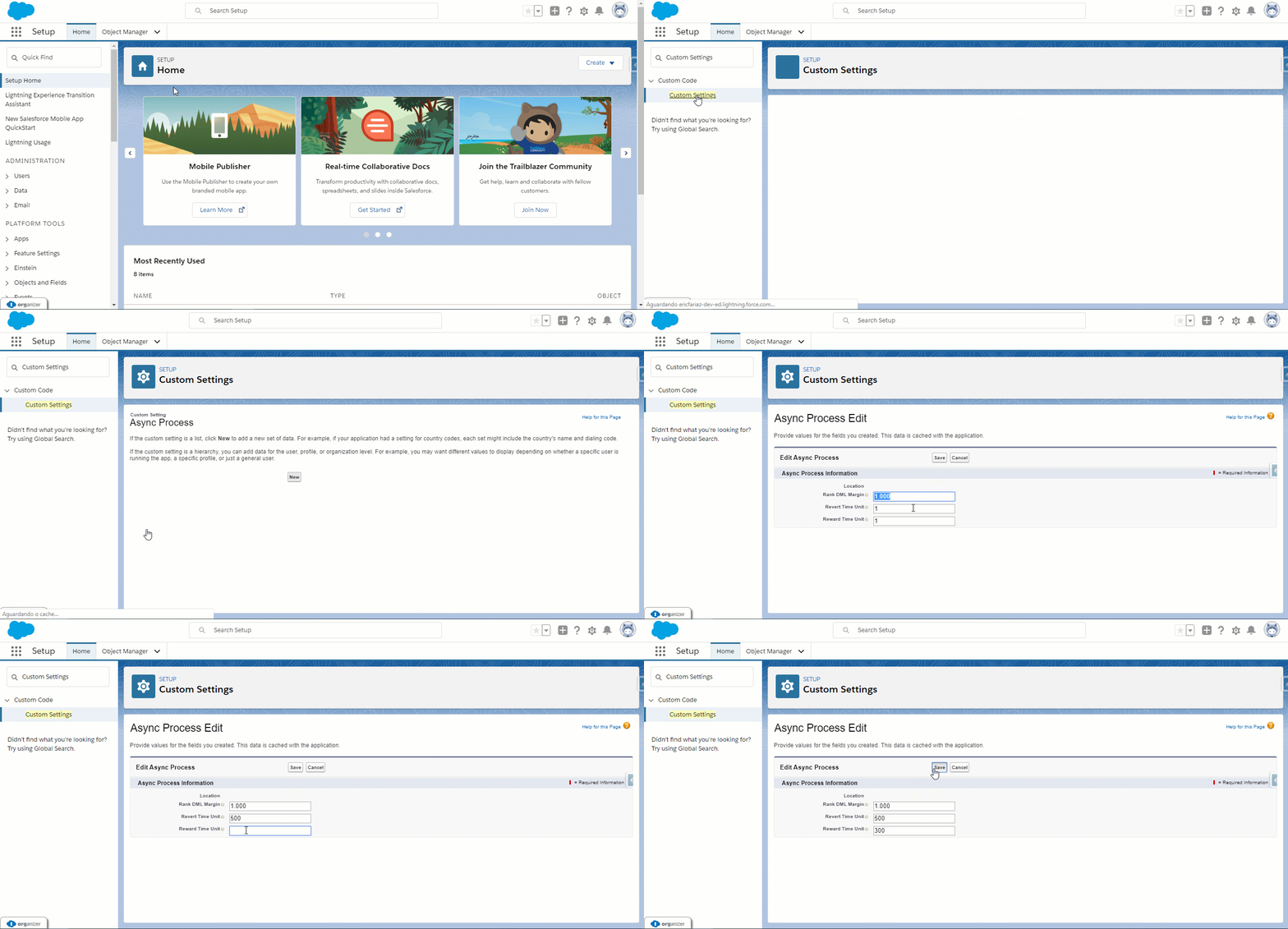
Once you are on the creation page, there are three parameters available to be configured:
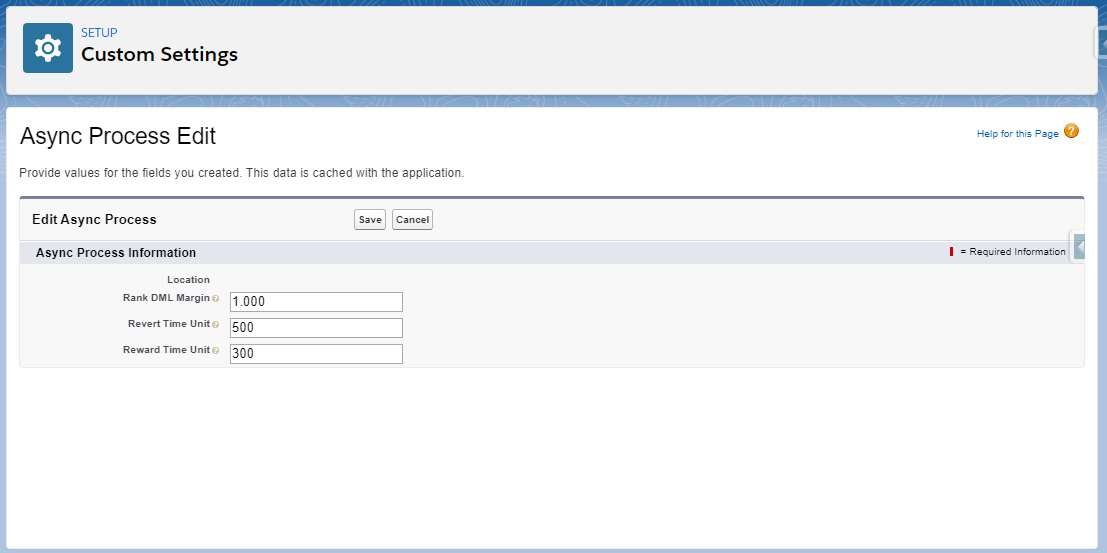
Rank DML Margin
It may occur that there are way too many team members to receive a rank to the point it exceeds the processing limit in your org. Rank DML Margin is used for setting up a data creation limit margin. The tool identifies how many insertions and modifications have been completed and compares it with the org’s limit.
The margin set is then deducted from the previous result, obtaining the quantity of data that can still be processed in real time.The remaining data is then processed asynchronously in small blocks.
Revert Time Unit
The reversion batch process happens as a single action and it can consume lots of processing for teams with plenty of members. This configuration ensures Salesforce processing limits won’t be achieved and all transactions reverted.
Revert Time Unit breaks down the processing by taking the remaining time for the task to be completed and dividing it by the time set in the field. The result of this division is the average amount of rewards to be processed in real time. When such an average of processes is reached, the remaining reversions will be performed asynchronously in small blocks.
Reward Time Unit
In case there are more members to be rewarded than the processing limit in your org allows, Reward Time Unit helps manage them, making sure no errors will occur while the process is taking place.
The tool breaks down the processing by taking the remaining time for the task to be completed and dividing it by the time set in the field. The result of this division is the average amount of time that real-time rewarding can take place. Whenever the average is reached, the remaining rewards will be performed asynchronously in small blocks.
Async Process Parameters Range
Both Margin and Time Units have the same range of values.
By filling in the fields with the value 1, which is the minimum, all processes will happen in real time, not using the asynchronous functionality at all.
In contrast, by filling them in with the value 10.000, which is the maximum, all the processes will happen asynchronously.
You may want to consider your org necessities before setting it up. By testing with the values previously presented here, you'll have an idea if you need to have more data being processed asynchronously (higher numbers) or in real time (lower numbers). For more information, please contact your Salesforce Admin or Systems Integrator.
Updated over 1 year ago