
Target Audience
The Target Audience section will give you all the tools necessary to add and organize the members within your program. Below is an overview of what you can expect to see within the Target Audience tab.
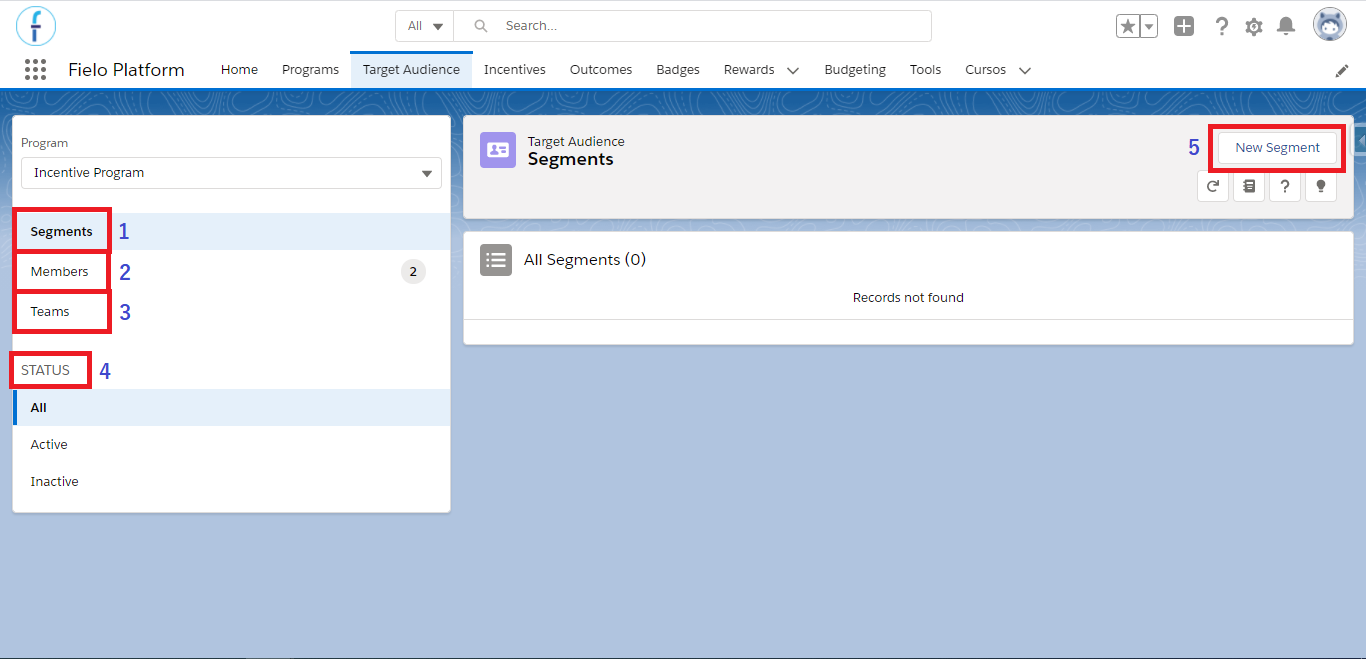
Segments
Segments are identifiable characteristics shared among a group of members based on their behavioral, demographic and profile-level information (e.g. gender, location, etc.). They enable you to more effectively target your incentives and rewards by addressing them to specific member subsets.
Members
Members are the people or companies that participate in your program. They form the community that you want to incentivize. You can target and motivate groups of members within your community using segments and levels. Upon completing incentives, members can earn Points and currencies, which can later be redeemed for rewards, as well as instant rewards and badges.
Teams
Teams consist of one or more individual or organization members that are brought together to work towards a common goal. Please remember that only active members will be able to join a team.
Status
This area will divide your Segments, Members, and Teams by their statuses. For example, while you are in Segments, the Status section will show All, Active, and Inactive. Members and Teams will have their own statuses that will be displayed in this section.
Create a new Target Audience
This button will allow you to create a new Segment, Member, or Team, depending on which section you are in. As you scroll through the 3 options, you will also notice the button text will change to help you know what you will actually be creating.
Updated over 1 year ago