
Mission Rewarding
Choose how you'll reward Members for completing Challenges and Missions
Mission Rewards are a way to reward members for successfully completing an individual mission. Like challenge rewards, they can take the form of Currencies (e.g. the standard Points) for Rewards, Instant Rewards and/or Badges.
Before setting up rewarding for your challenge, be sure that you've created at least one mission.
Mission Rewarding Schemes
Rewarding schemes allow you to configure how mission rewards are awarded to members who have successfully completed a mission. Depending on the type of Mission and its Leaderboard Mode, there are several rewarding schemes to choose from. Note that, for team Challenges, any reward will be given to each of the members individually.
Missions using Based on a Fixed Metric
-
Just one reward, one or more times
To be used with: No Leaderboard, Order of completion or By performance value LeaderboardsUse this scheme if your mission will have just one mission reward. When the member accomplishes the Mission's criteria, he is qualified to receive the reward that you define: either at the end of the challenge or as soon as they accomplish the mission.
Note that, when using Just one reward, one or more times, you will have to first specify the rewarding scheme, the rewarding time and Save your choice. Only after that, you define what reward you want to give by clicking on New.
E.g. Use this scheme to reward Members who logs in to your Portal with 50 Points.
-
Based on performance metrics at the end of the challenge
To be used with: No Leaderboard or By performance value LeaderboardUse Based on performance metrics at the end of the challenge to reward members based on performance metrics at the conclusion of a challenge. For each mission reward, you'll specify the range of performance percentage values (e.g. between 101% and 110% for those who accomplishes 1% to 10% more than the objective) that will qualify a member for a specific reward, so that you can give different rewards depending on the member's performance.
E.g. Use this scheme to give 50 Dollars for Members that didn't accomplish the Mission, and 120 Dollars for those that do and reach up to 110% of the Mission's objective. This is a great scheme to incentivize all Members to accomplish more.

Based on performance metrics at the end of the challenge - setup example
-
Based on performance rankings at the end of the challenge
To be used with: By performance value LeaderboardUse Based on performance rankings at the end of the challenge to reward members based on performance rankings at the conclusion of the challenge. For each mission reward, you'll specify the range of rankings that will qualify a member for the reward.
E.g. If you want to reward 50 Points to the members who are in third place at the end of the challenge, define the range as between 3 and 3 and the reward as 50 Points. This scheme rewards only the Members who reach the ranks that you defined for rewarding.

Based on performance rankings at the end of the challenge - setup example
-
Different rewards depending on the order of goal completion
To be used with: Order of completion LeaderboardUse this scheme to reward members based on the order in which they accomplish a mission. For each mission reward, you'll specify the range of time Positions that will qualify a member for the reward.
Note that, when using Different rewards depending on the order of goal completion, you will have to first specify the rewarding scheme, the rewarding time and Save your choice. Only after that, you define the range and rewards you want to give by clicking on New for each new reward.
E.g. If you want to give 100 Points for the member who finishes first and 50 Points for who finishes second, you'll have to create a new reward for each of these scenarios. This scheme rewards only the Members who accomplish the Mission in the order that you defined.

Different rewards depending on the order of goal completion - setup example
-
Different rewards depending on the member's level
To be used with: No LeaderboardUse Different rewards depending on the member's level to reward members based on their level. For each active level within your program, you'll specify a mission reward - only one reward per level in each mission. Members without level or with one not specified in the configuration to receive a reward, won't receive any.
E.g. Use this scheme to give 150 Dollars to all the Members who accomplish the Mission and that are Bronze Level, and 200 Dollars to those that are Silver Level.

Different rewards depending on the member's level - setup example
Missions using Compare Among Members
-
Based on performance metrics at the end of the challenge
To be used with: No Leaderboard or By performance value LeaderboardUse Based on performance metrics at the end of the challenge to reward members based on performance metrics at the conclusion of a challenge. For each mission reward, you'll specify the reward to be given according to how the mission's aggregation was set when created.
E.g. If the mission was created using Sum up and you defined different rewards to be given to members with sum up values from 1000 to 501 and 500 to 0, the rule will award a member who has accomplished the value 400 accordingly. The same will happen if the mission's aggregation was set to Count.

Based on performance metrics at the end of the challenge - setup example
-
Based on performance rankings at the end of the challenge
To be used with: By performance value LeaderboardUse Based on performance rankings at the end of the challenge to reward members based on performance rankings at the conclusion of the challenge. For each mission reward, you'll specify the range of rankings that will qualify a member for the reward.
E.g. If you want to reward 50 Points to the members who are in third place at the end of the challenge, define the range as between 3 and 3 and the reward as 50 Points. This scheme rewards only the Members who reach the ranks that you defined for rewarding.

Based on performance rankings at the end of the challenge - setup example
-
Successive, real-time rewarding based on performance
To be used with: No Leaderboard or By performance value LeaderboardUse cumulative rewarding to provide successive, real-time rewarding to members according to their performance. Each time a member's performance passes into the next rewarding level, the member gets that reward immediately.
Note that, when using Successive, real-time rewarding based on performance, you will have to first specify the rewarding scheme, the rewarding time and Save your choice. Only after that, you define the range and rewards you want to give by clicking on New for each new reward.
E.g.
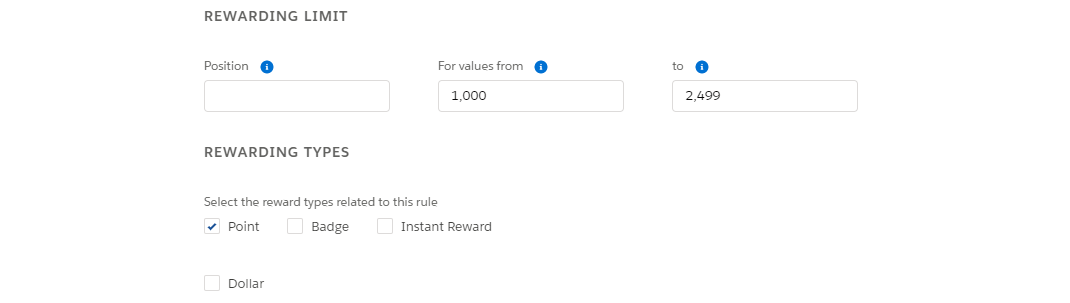
Successive, real-time rewarding based on performance - setup example
-
Different rewards depending on the member's level
To be used with: No Leaderboard or By performance value LeaderboardUse Different rewards depending on the member's level to reward members based on their level. For each active level within your program, you'll specify a mission reward - only one reward per level in each mission. Members without level or with one not specified in the configuration to receive a reward, won't receive any.
E.g. You might decide that all the Bronze level Members will receive 150 Points if they participate in the challenge and accomplish the Mission. Note that, for missions compare among members, all members who participate in the challenge will receive the reward according to their level when the challenge ends.

Different rewards depending on the member's level - setup example
Adding a Mission Reward
From your Challenge page, on the Missions card, click in the row corresponding to the target Mission and select Mission Reward.
Be aware that, after creating a mission reward, you can only edit missions based on member's level and the rewarding ranges in missions that are based on member performance.
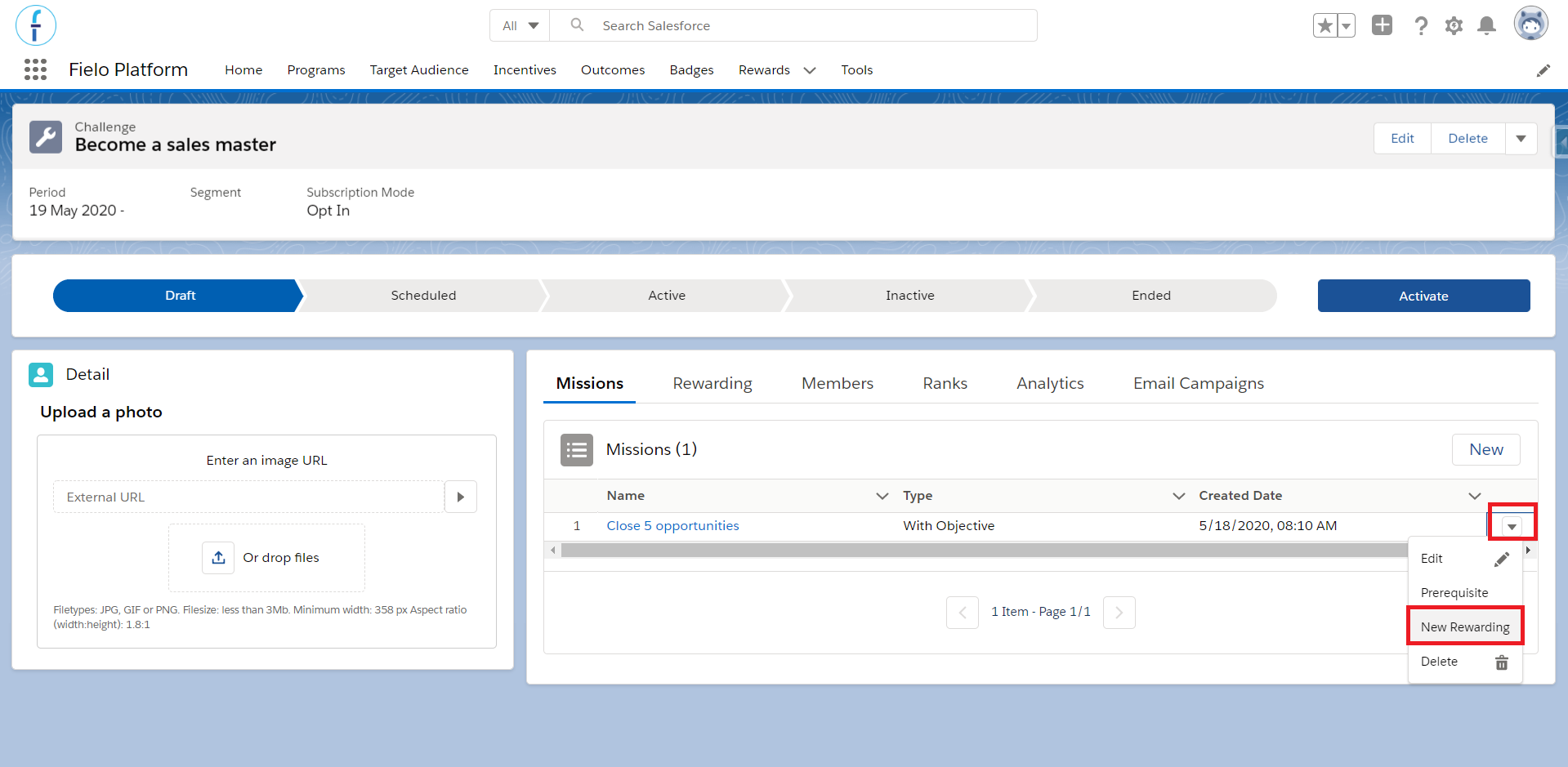
Creating a new mission rewarding
An alternative way, is to click on the mission's name in order to access its page. At the bottom, select Specify Rewarding Scheme or New within the Rewarding related list.
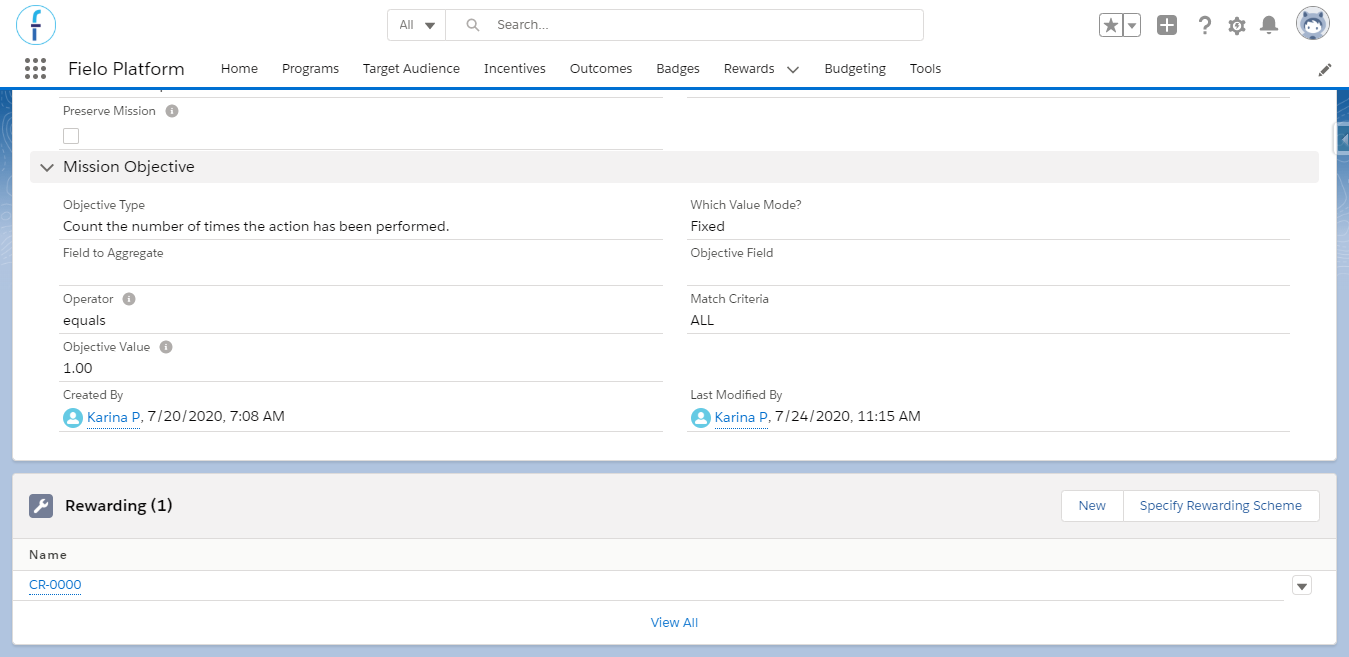
Mission page
Choose the rewarding scheme you want to use. Then, choose when you want the rewarding to occur:
- Mission Accomplished means that winning members will be rewarded as soon as they accomplish the mission. This option is only available for Just one reward, one or more times, Different rewards depending on the order of goal completion and Different rewards depending on the member's level (for missions based on a fixed metric).
- Challenge Finished means that winning members will be rewarded at the conclusion of the challenge that the mission is a part of.
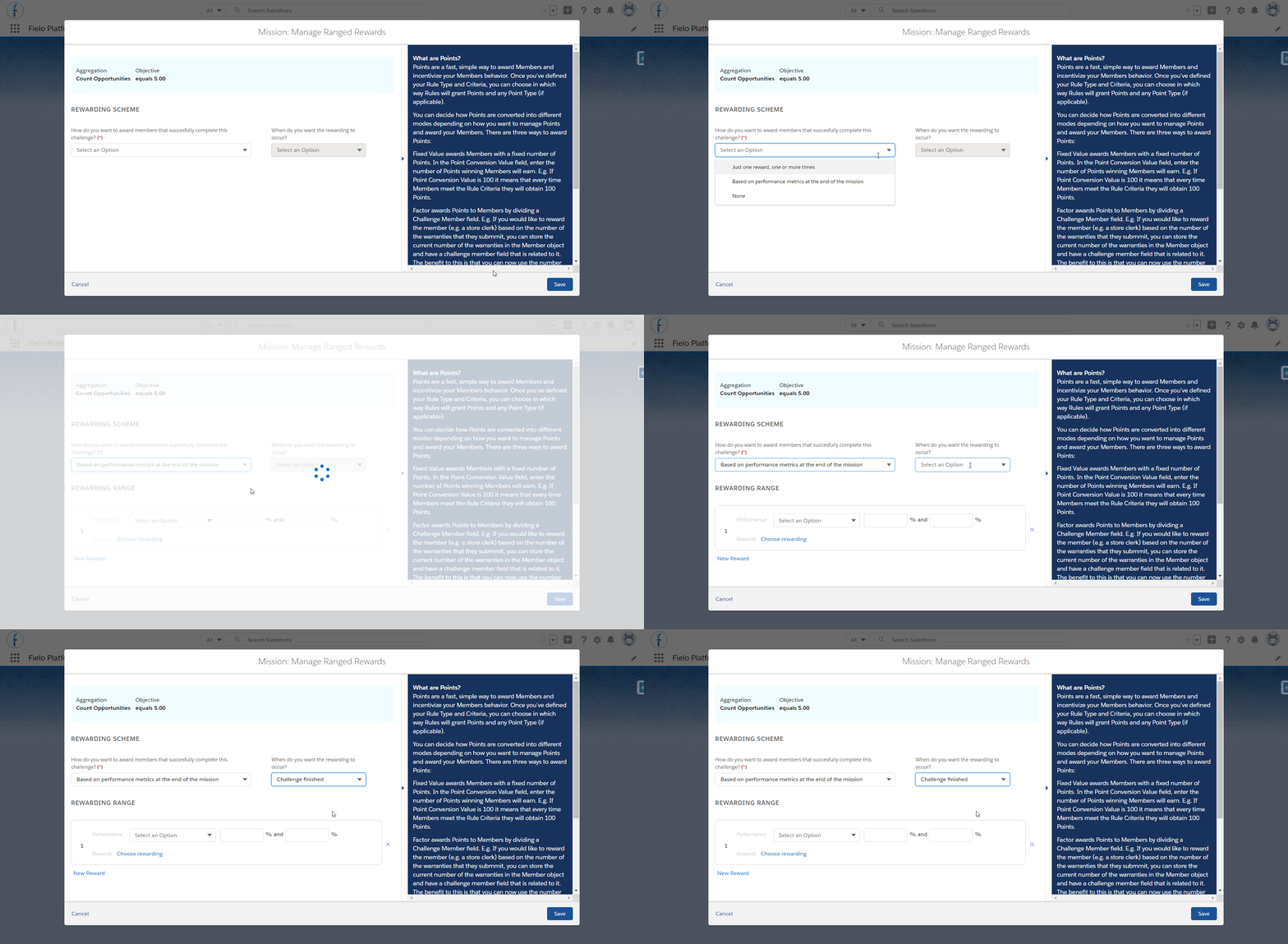
Choosing the rewarding scheme for a ranged reward.
Finally, enter any range of values that your rewarding scheme might require, specify Rewarding (i.e. currencies, Instant Rewards and/or Badges) and, when you're ready, click Save.
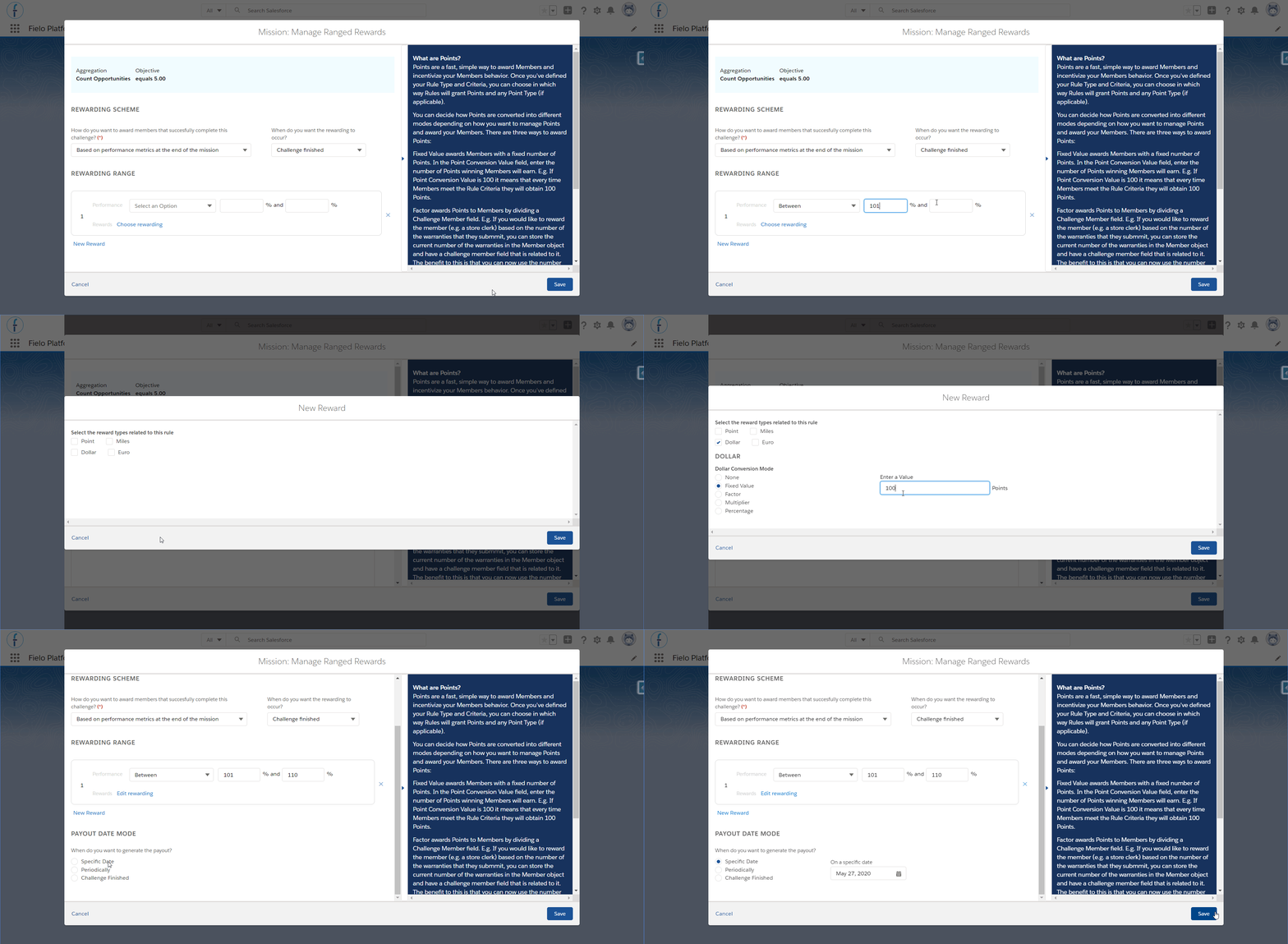
Choosing the rewarding for a ranged reward.
Incentives cannot deduct points. Avoid inputting negative values.
Updated over 1 year ago