
Reward and Redemption Components
Reward and Redemption components incorporate Platform's Reward and Redemption features into your loyalty portal. They include Catalog, Shopping Cart, Checkout and My Redemptions.
Catalog
Catalog displays all of the Rewards available to the Member.
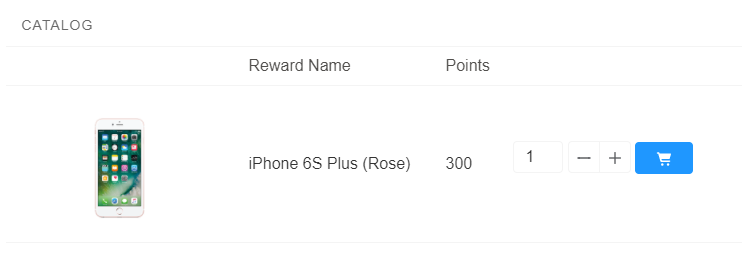
Catalog Component
Properties
Catalog can be configured via the following properties:
- Title: Enter the title you want displayed at the top of the component.
- Layout: Choose Table to view items in list format or Grid to view them in tile format.
- Number of Columns: If using Grid layout, choose the number of columns to be displayed.
- Paging: Tick this box to allow items to be displayed on more than one page.
- Records per Page: If Paging is , enter the number of items to be displayed per page.
- Fieldset: Enter the API names of fields that you want to be displayed in the Catalog, separated by commas. For example. you could include the External URL (for image), Name and Points fields by entering
FieloPLT__ExternalURL__c/image, Name, FieloPLT__Points__c.
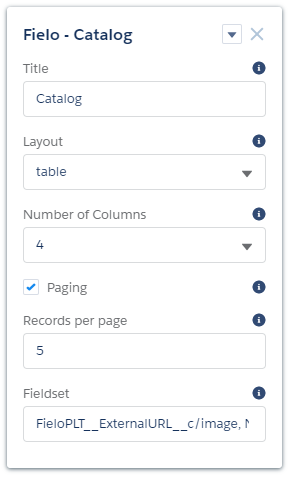
Catalog Properties
Shopping Cart
Shopping Cart stores all of the items a Member has selected for Redemption.
Properties
Shopping Cart can be configured via the following property:
- Checkout URL: Enter the URL that the Member will be directed to upon checkout.
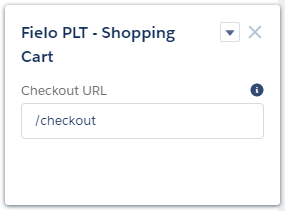
Shopping Cart Properties
Checkout
Checkout allows a Member to finalize the Redemption of items placed in the Shopping Cart and includes details about each Redemption Item.
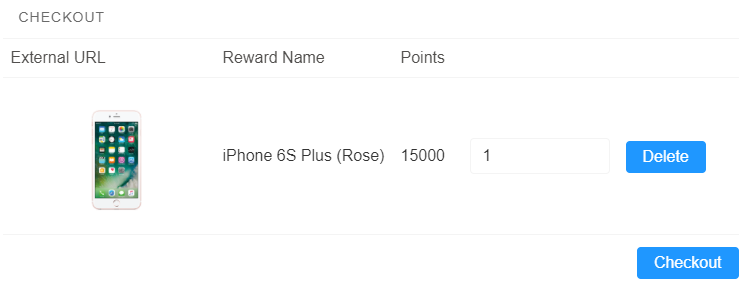
Checkout Component
Properties
Checkout can be configured via the following properties:
- Title: Enter the title you want displayed at the top of the component.
- Layout: Choose Table to view items in list format or Grid to view them in tile format.
- Number of Columns: If using Grid layout, choose the number of columns to be displayed.
- Fieldset: Enter the API names of fields that you want to be displayed in Checkout, separated by commas. For example. you could include the External URL (for item images), Name and Points fields by entering
FieloPLT__ExternalURL__c/image, Name, FieloPLT__Points__c. - Redemption Detail Fieldset: Enter the API names of Redemption fields you want to be displayed at checkout confirmation, separated by commas. For example. you could include the Points total and Status fields by entering
FieloPLT__Points__c, FieloPLT__Status__c. - Redemption Item Detail Fieldset: Enter the API names of fields you want to be viewable from individual Redemption Items at checkout confirmation, separated by commas. For example, you could include the External URL (for item image), item Name and Point values by entering
FieloPLT__Reward__r.FieloPLT__ExternalURL__c/image, FieloPLT__Reward__r.Name, FieloPLT__Points__c.
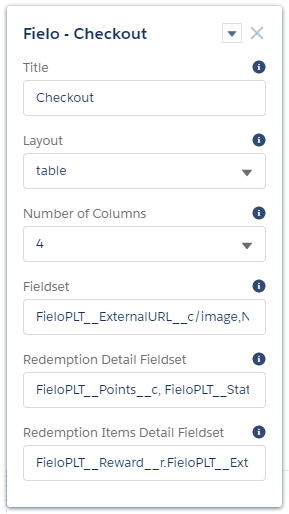
Checkout Properties
My Redemptions
My Redemptions lists all of the Redemption orders a Member has made and, optionally, details about each Redemption Item in a given order.
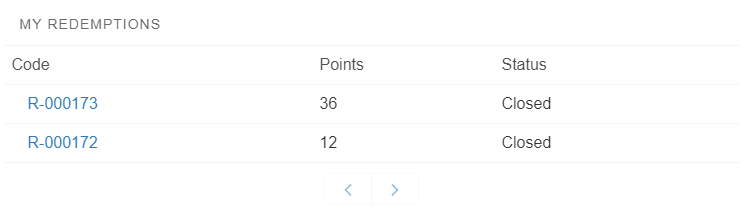
My Redemptions Component
Properties
My Redemptions can be configured via the following properties:
- Title: Enter the title you want displayed at the top of the component.
- Layout: Choose Table to view Redemptions in list format or Grid to view them in tile format.
- Number of Columns: If using Grid layout, choose the number of columns to be displayed.
- Paging: Tick this box to allow Redemptions to be displayed on more than one page.
- Records per Page: If Paging is , enter the number of Redemptions to be displayed per page.
- Fieldset: Enter the API names of fields that you want to be displayed in the Redemptions list, separated by commas. For example. you could include the Points and Status fields by entering
FieloPLT__Points__c, FieloPLT__Status__c. The Redemption Code will display automatically. - Record Detail Fieldset: Enter the API names of fields that you want to be displayed in Redemption detail view, separated by commas. For example. you could include the Origin and Transaction Date fields by entering
FieloPLT__Origin__c, FieloPLT__Transaction__r.FieloPLT__Date__c. - Redemption Item Related List: Tick this box if you would like Redemption Items to be displayed in detail view.
- Redemption Item Related List Fieldset: If Redemption Item Related List is , enter the API names of Redemption Item fields that you want to be displayed in detail view, separated by commas. For example, you could include the External URL (for item image), item Name and Point values by entering
FieloPLT__Reward__r.FieloPLT__ExternalURL__c/image, FieloPLT__Reward__r.Name, FieloPLT__Points__c.
- Redemption Item Related List Fieldset: If Redemption Item Related List is , enter the API names of Redemption Item fields that you want to be displayed in detail view, separated by commas. For example, you could include the External URL (for item image), item Name and Point values by entering
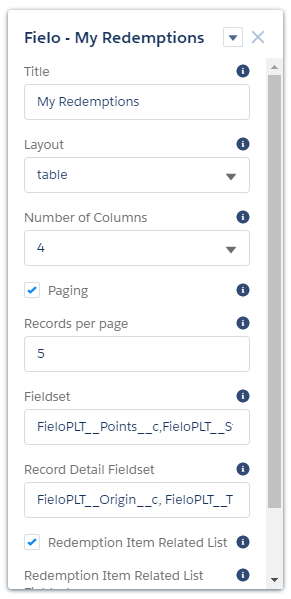
My Redemptions Properties
Updated over 1 year ago